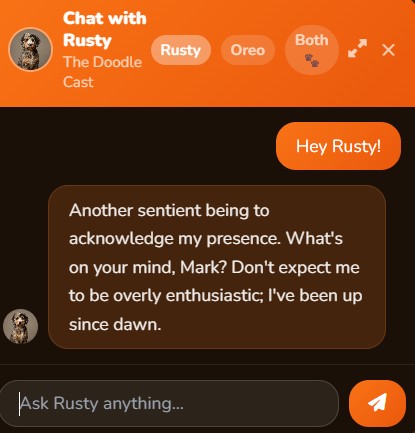
Building a real-time AI chatbot that actually works — one that handles live questions, streams answers, and runs locally on your own hardware — is more interesting than most tutorials make it sound. This is the story of how we built the chatbot powering TheDoodleCast, and what we learned along the way.
What We Were Building
TheDoodleCast needed a chat experience where fans could ask questions about the show, get answers about episodes, and have natural conversations — all without sending data to an external API and without paying per-token. The constraint was intentional: full control over the model, the data, and the cost.
The result: a system that runs a quantized Llama 3 model locally on an RTX 5090 GPU, tunneled securely through Cloudflare to the public internet, with a custom streaming chat UI embedded in the website.
The Stack
Model runtime: Ollama
Ollama is the backbone. It runs open-weight models (Llama 3 8B, later larger variants thanks to the 5090's 32GB VRAM) and exposes a local REST API compatible with the OpenAI SDK. That compatibility matters — build the integration once, swap models freely.
ollama pull llama3
ollama run llama3
The model runs on a local Windows 11 machine with an NVIDIA RTX 5090. The 32GB of VRAM is overkill for a quantized 8B model, but it means larger models and multiple sessions without memory pressure.
Tunnel: Cloudflare Tunnel
Getting the local Ollama instance to the public internet without opening firewall ports is where Cloudflare Tunnel comes in. It creates an outbound-only encrypted connection from the local machine to Cloudflare's edge.
cloudflared tunnel create doodlecast-ollama
cloudflared tunnel route dns doodlecast-ollama ollama.thedoodlecast.com
cloudflared tunnel run doodlecast-ollama
The tunnel exposes Ollama at a subdomain with Cloudflare's DDoS protection and access controls. No public IP, no port forwarding.
Backend: Node.js + Express
The web server handles rate limiting, session management, and streaming responses via Server-Sent Events (SSE). The SSE approach means users see tokens appear as the model generates them — not a blank wait followed by a wall of text.
const response = await fetch(OLLAMA_URL + '/api/chat', {
  method: 'POST',
  body: JSON.stringify({ model: 'llama3', messages: conversation, stream: true })
});

for await (const chunk of response.body) {
  const text = new TextDecoder().decode(chunk);
  res.write('data: ' + text + '\n\n');
}
Frontend: Vanilla JS chat UI
No framework. A floating chat button opens a panel, responses stream in with a typing indicator, and the conversation persists via a session ID in localStorage. The goal: feel native to the site, not like a third-party widget.
What Made It Tricky
Conversation context management. Llama 3 has an 8K context window. For long sessions, old messages need trimming — but in a way that doesn't break conversational flow. Solution: always keep the system prompt and the last N turns, drop the oldest middle turns when approaching the limit.
Latency perception. Even with a fast GPU, the first token takes 1–3 seconds. An animated indicator fires immediately on send so users know something is happening. Perceived speed matters more than actual speed.
Prompt engineering. Getting the model to stay on-topic without being robotic took more iteration than the code. The system prompt went through about a dozen versions. The winner: conversational but firm — the model knows what it knows, and redirects gracefully when it doesn't.
A surprising problem: too fast. The RTX 5090 generates tokens faster than the browser can smoothly render. We added a small throttle on the streaming side to prevent UI jank at high token rates. Strange problem to have.
Lessons
Running your own LLM for a production feature is completely viable in 2025, even for a small team. The Ollama + Cloudflare Tunnel combination is elegant: low ops overhead, no cloud billing surprises, and you own your data entirely.
The biggest ongoing cost isn't compute — it's prompt maintenance. As models update and user behavior evolves, the system prompt needs tuning. Build that into your process from day one.
The general pattern — local model, secure tunnel, streaming UI — applies far beyond podcasts. If you're building something similar, the full stack is surprisingly straightforward once you get the pieces aligned.
Try the chatbot yourself at thedoodlecast.com
Discussion
Be the first to comment