Showspring
How Showspring got built. The product lives at showspring.com — this page is the engineering side of the story, using The Doodle Cast as the worked example. Every pipeline step, every model, every decision we made along the way.
This full episode of The Doodle Cast was produced end-to-end by Showspring — from idea to YouTube publish.
Build log
v1.0 → v2.2AI video tools generate clips. We produce episodes.
Tools like Veo, Kling, Higgsfield, and Firefly are remarkable at generating individual video clips. But producing a complete YouTube episode — with narrative structure, multi-character dialogue, consistent visuals, sound design, and music — still takes dozens of hours of manual stitching, editing, and rendering. Showspring eliminates that gap entirely.
From idea to YouTube in 10 steps
The first thing Showspring shipped: a 10-step episode pipeline that turns The Doodle Cast from a manual production into a daily-publishable show. Each step is a route in the app, not a separate tool.
Brainstorm → script → voice readout → location mapping → scene gen → video gen → trim → audio mix → render → publish. End-to-end on the VPS, no editor in the loop for the happy path.
Frame-accurate timeline accumulation across 30+ clips per episode. ffmpeg drifts when you concatenate floats, and on an 8-minute episode the audio walks off the picture by the back half. The pipeline now walks the timeline as integer frames and every consumer reads from the same canonical manifest.
YouTube publish had no idempotency. A retry after a network blip would post the same episode twice. Caught when an early episode hit the public feed in duplicate within 90 seconds; the publish step now keys off a content hash before posting.
The pipeline runs daily. Adding a new step inside this surface is a one-day lift. Adding a NEW production mode (Shorts, Podcast, Guest preview) costs multiple weeks — the cross-step contracts are tighter than they look. That tradeoff became visible in v1.1.
Creative Director
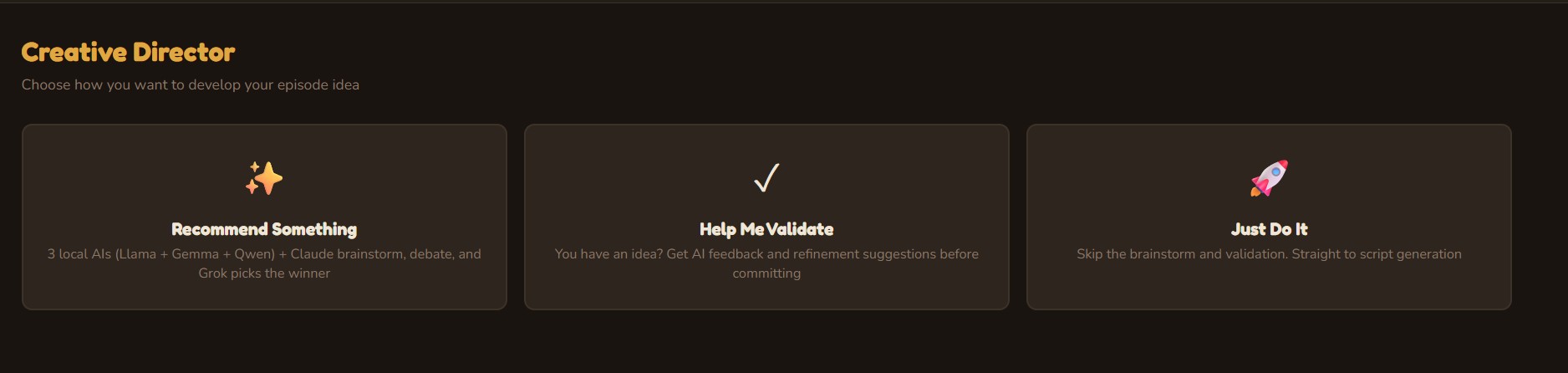
Three AI personas independently brainstorm episode concepts, then debate their merits. A judge AI (Grok 4) evaluates each pitch with live web search for topical relevance and selects a winner — or you bring your own idea and let the panel validate it. v1.2 adds a Research & Debate mode where Grok 4 conducts deep web research to build fact-heavy, current scripts.
Script Writer
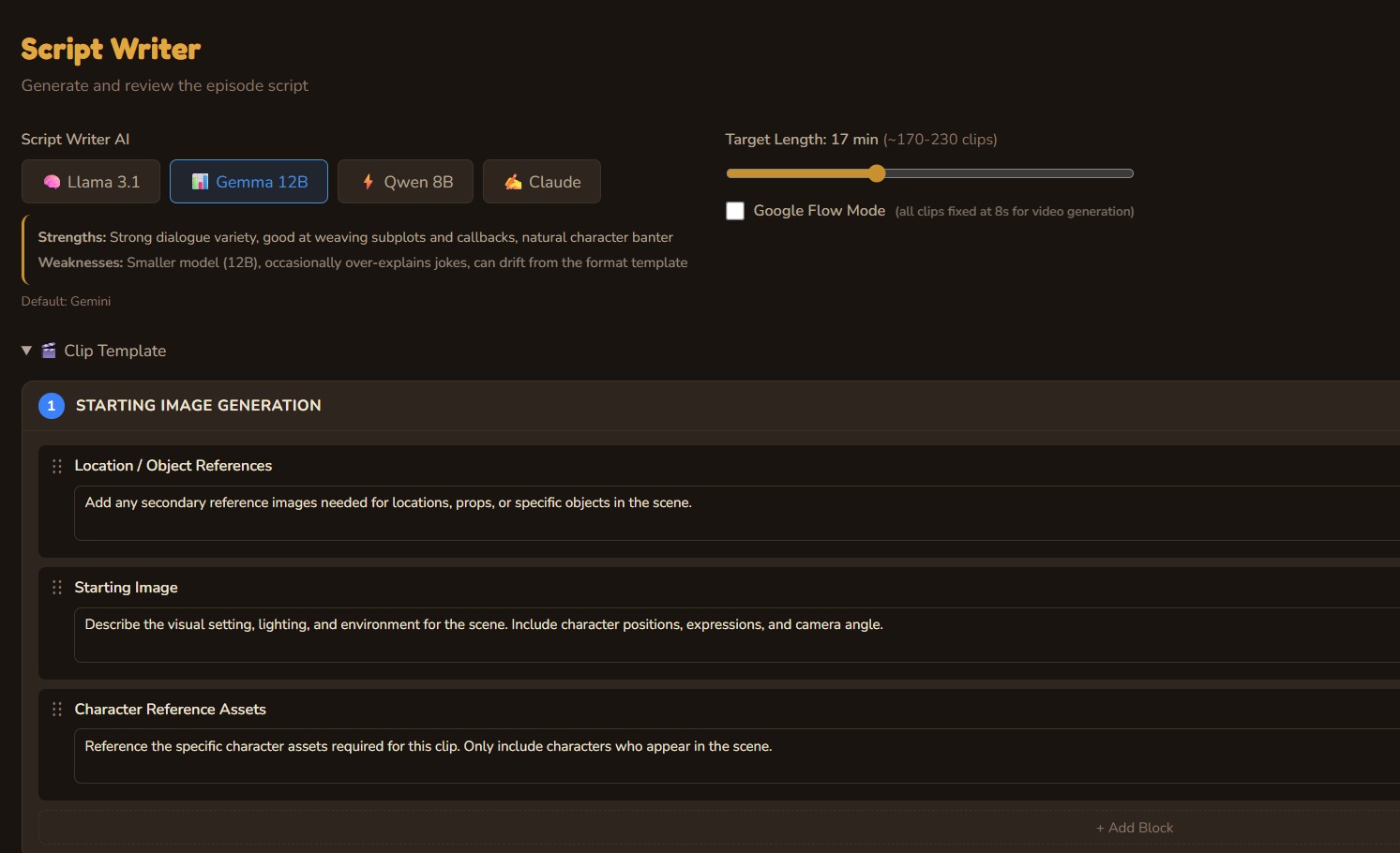
Choose your LLM — Qwen3, Gemma3, Gemini, or Claude — and generate a full episode script with structured clips, character dialogue, scene descriptions, and image prompts. The writer is trained on the show bible: a living knowledge base that evolves with every episode, ensuring character consistency and avoiding repeated plotlines.
Voice Readout
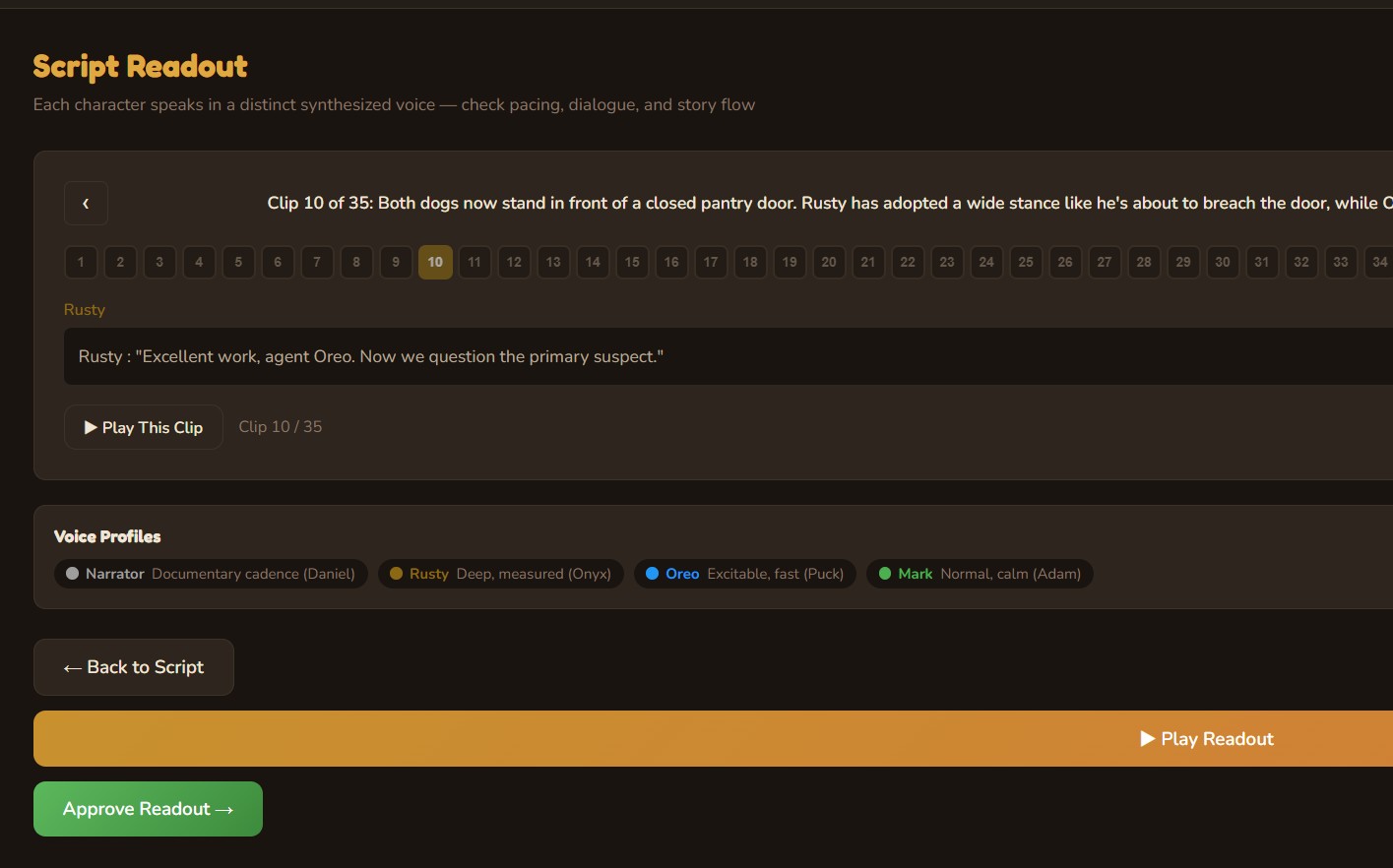
Every character speaks in a distinct synthesized voice. The narrator delivers a documentary cadence; Rusty speaks with deep, measured authority; Oreo is excitable and fast. Play through the full episode readout to check pacing, dialogue flow, and story structure before committing to visual production.
Location Mapping
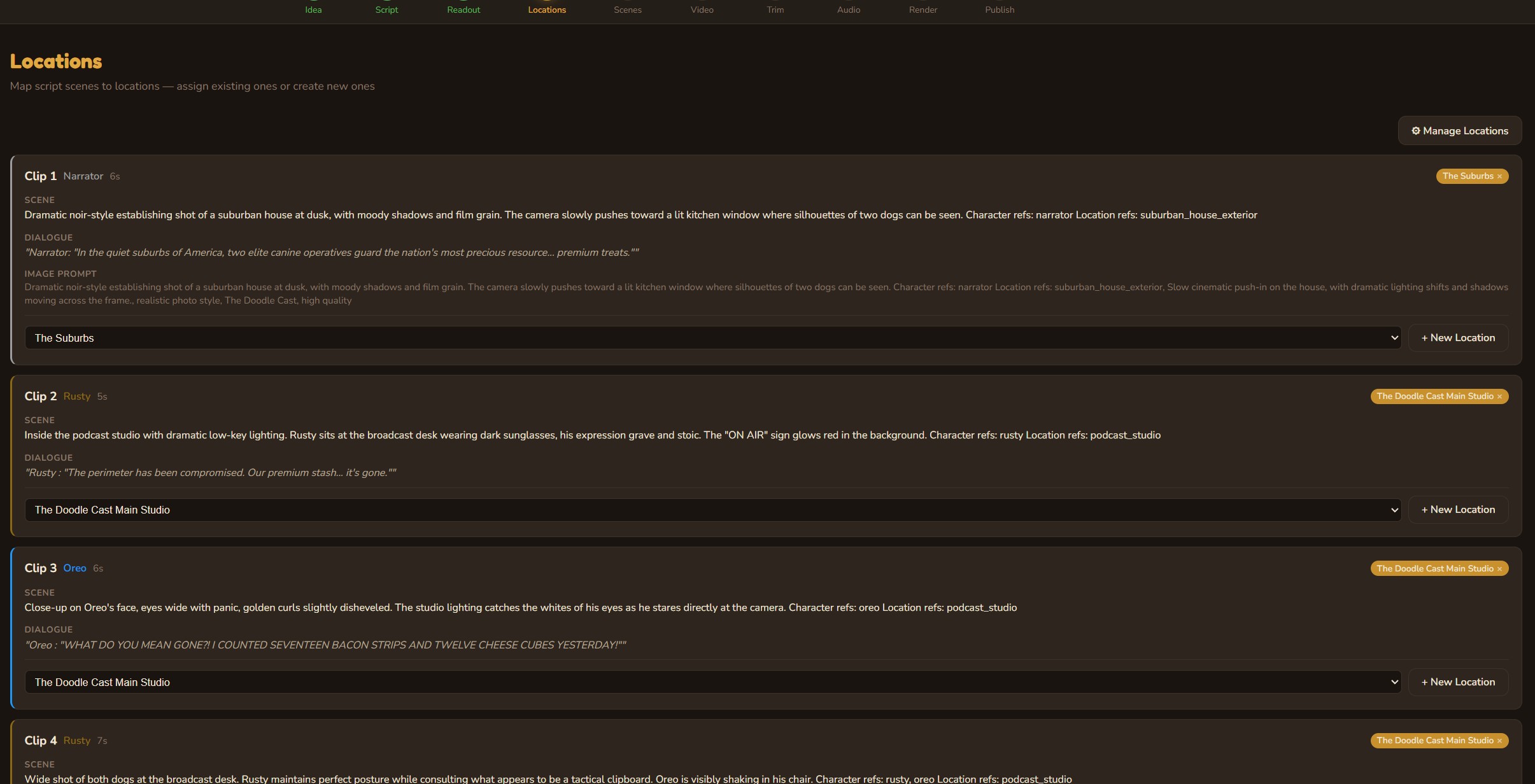
AI extracts every location from the script and maps them to clips. Build a reusable location library with reference images, visual descriptions, and default prompts. Locations carry their visual identity across episodes — the studio always looks like the studio.
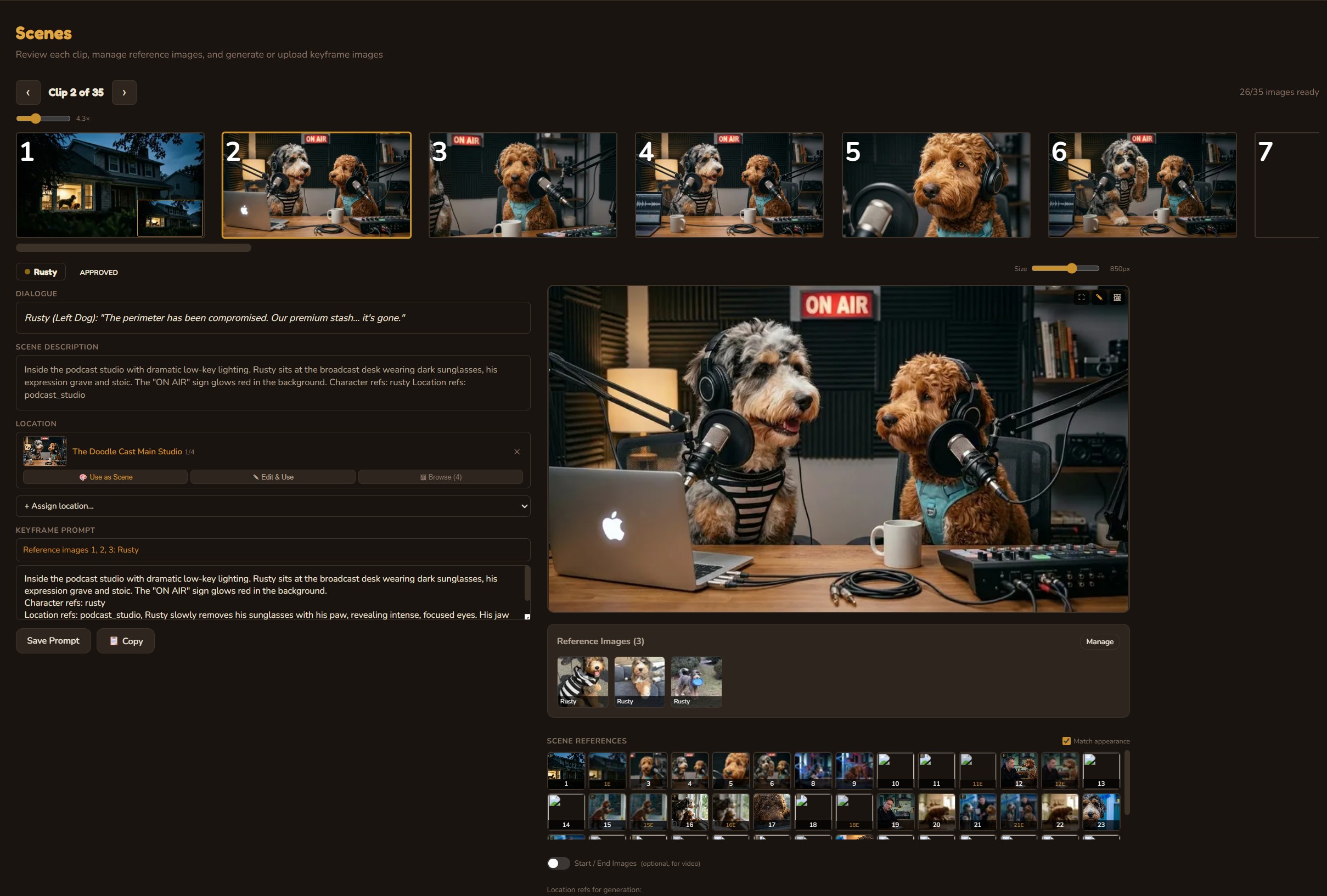
Scene Generation
Generate photorealistic images for each clip, informed by character reference sheets, location images, scene references, and scene descriptions. Every generation considers the visual context — character appearance, location lighting, camera angle — to maintain consistency across 30+ scenes. Start and end images for each clip enable smooth I2V video generation. Full image history with undo, AI-assisted editing, and Google Flow mode for iPad/PC-sourced photos.
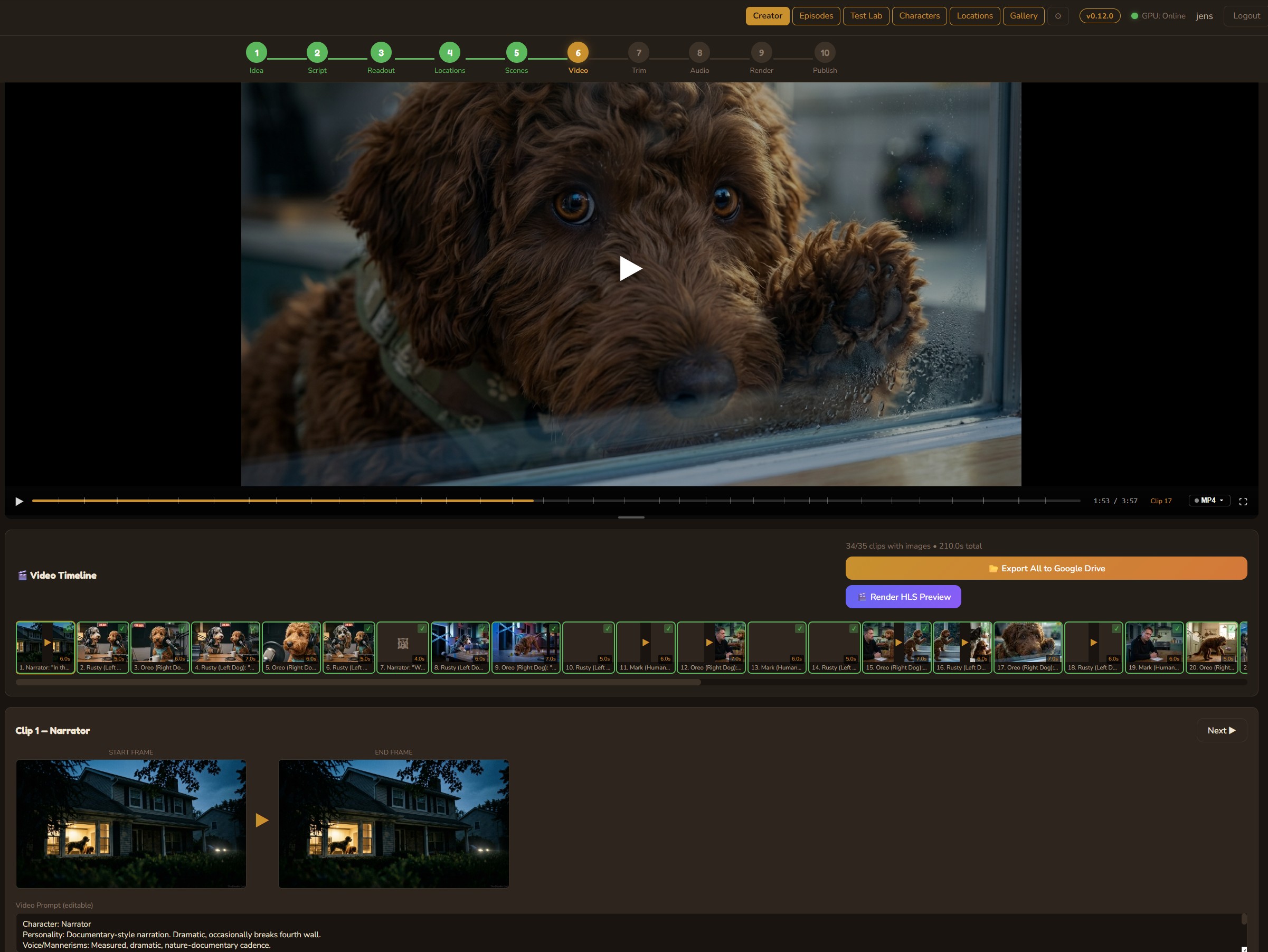
Video Generation
Transform scene images into motion using cloud models like Google Veo or local open-source models (WAN 2.2, LTX 2.3) on an RTX 5090. The DaVinci Resolve-style timeline shows every clip with start/end frames, status badges, and a composite episode preview player that sequences all completed clips in real time.
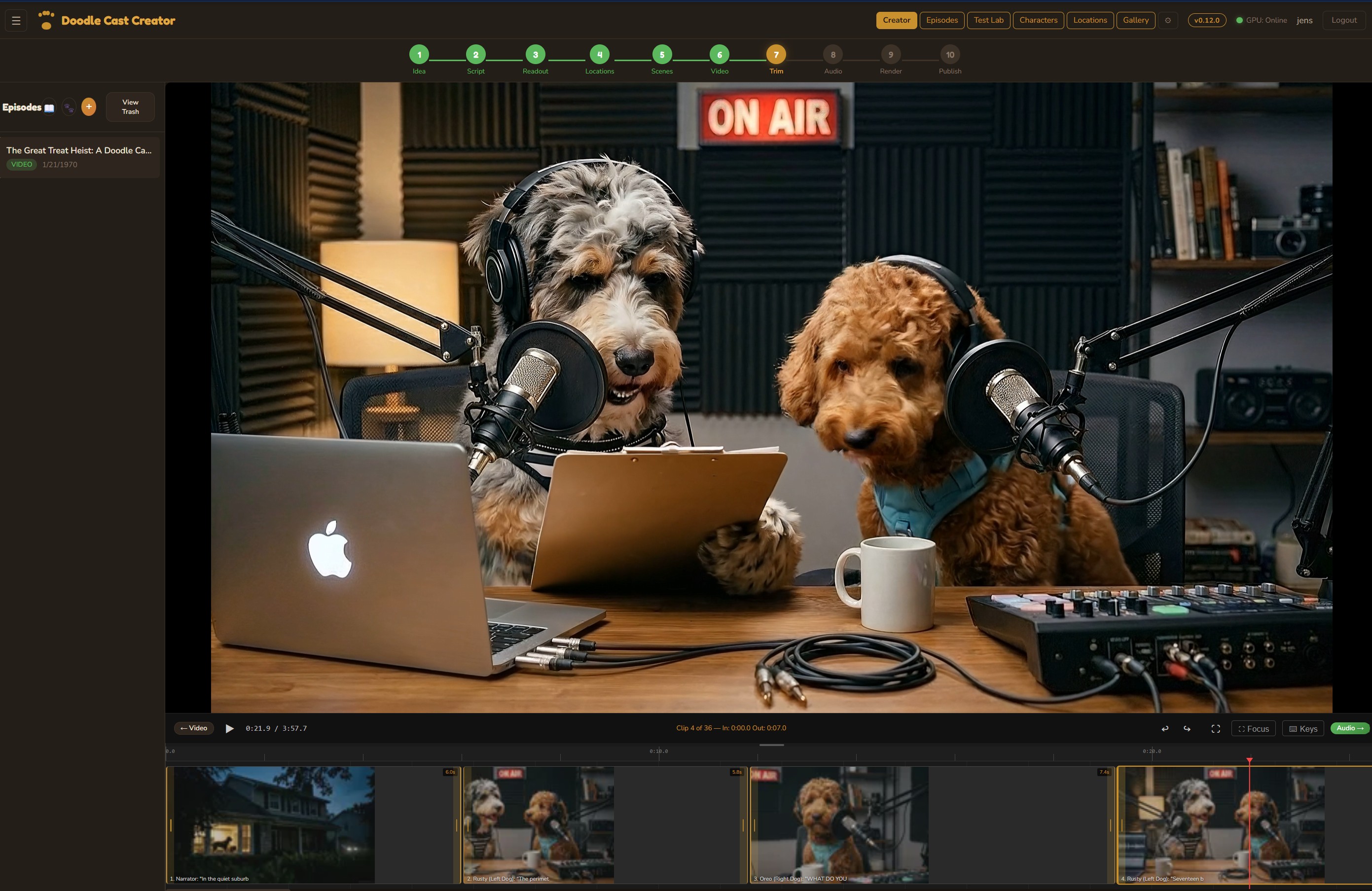
Trim Editor
Fine-tune every clip with frame-accurate trim points. Set in/out markers, adjust clip durations, and preview the result instantly. The trimmed timeline carries forward to the audio mix and final render.
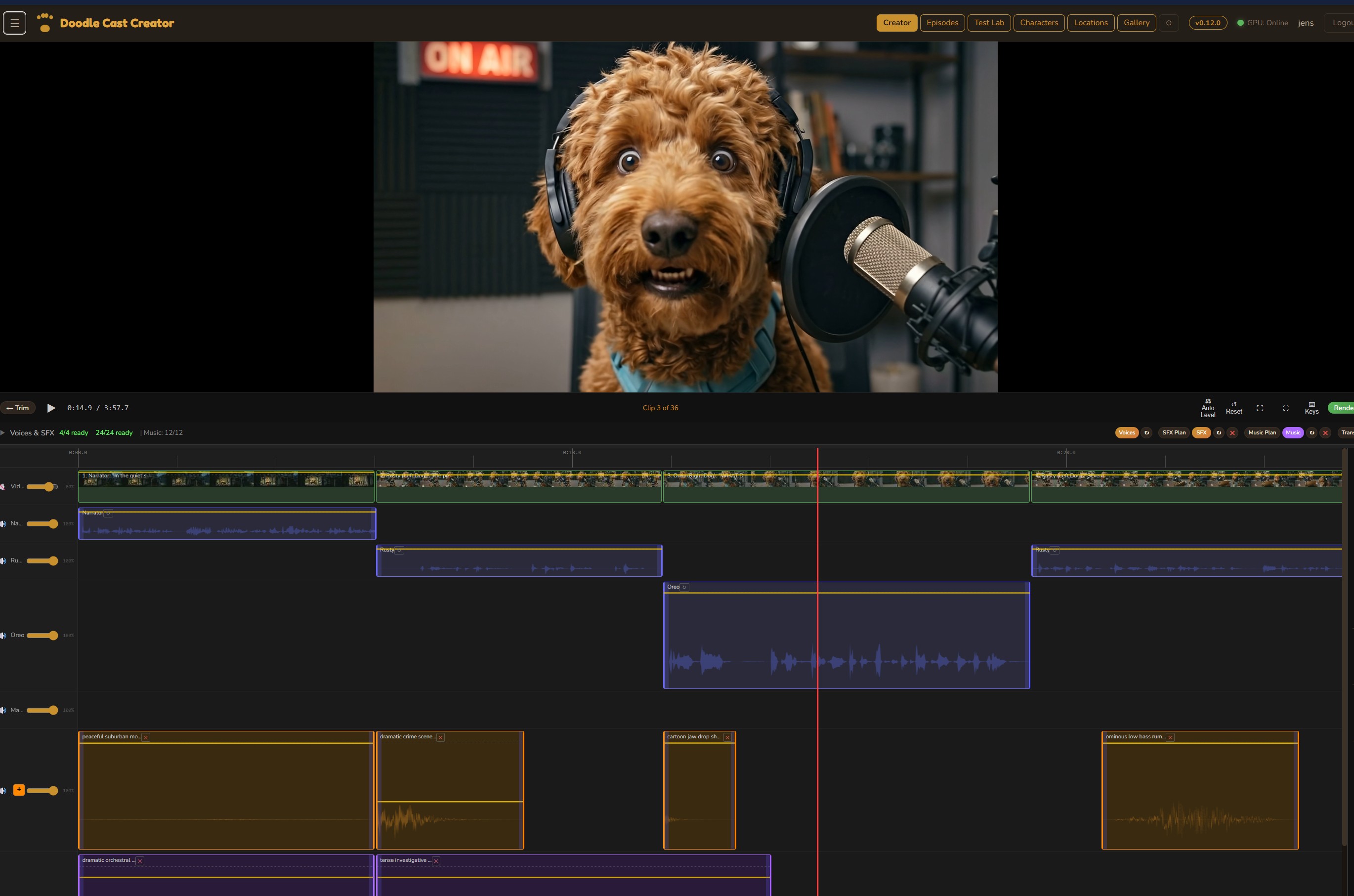
Audio Mix
A full multi-track audio editor with four lanes: background video audio, voice dialogue, sound effects, and music. Each track has independent volume control with keyframe automation. Generate SFX and music from text descriptions, position them on the timeline, and fine-tune the mix — all inside the browser.
Render Engine
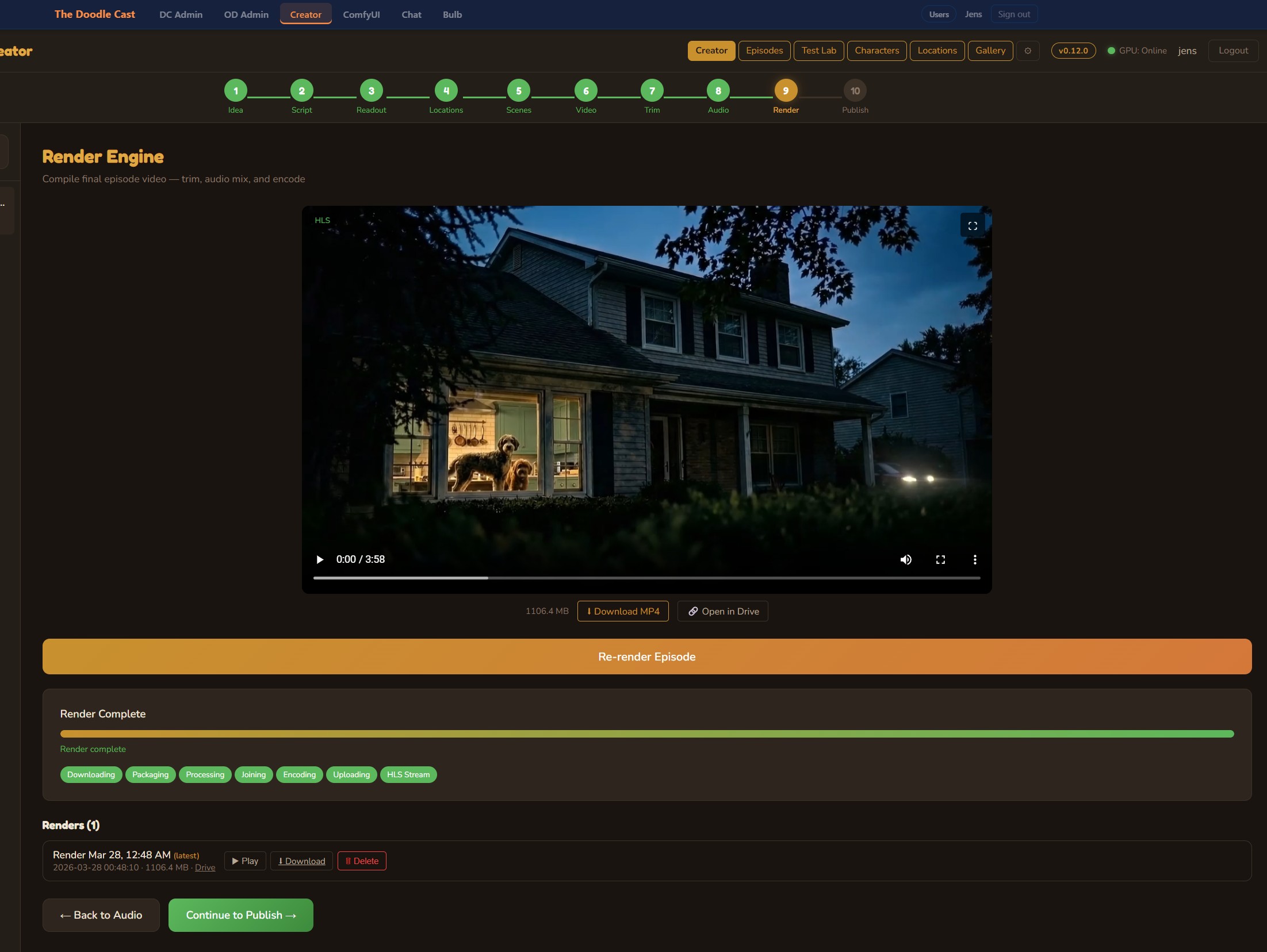
One button, full episode render. The engine trims each clip, applies the complete audio mix with ffmpeg filter graphs, concatenates everything (including the outro), and encodes the final MP4. When the RTX 5090 is online, encoding runs on NVENC for speed; otherwise, VPS CPU fallback handles it. Output goes straight to Google Drive.
Publish to YouTube
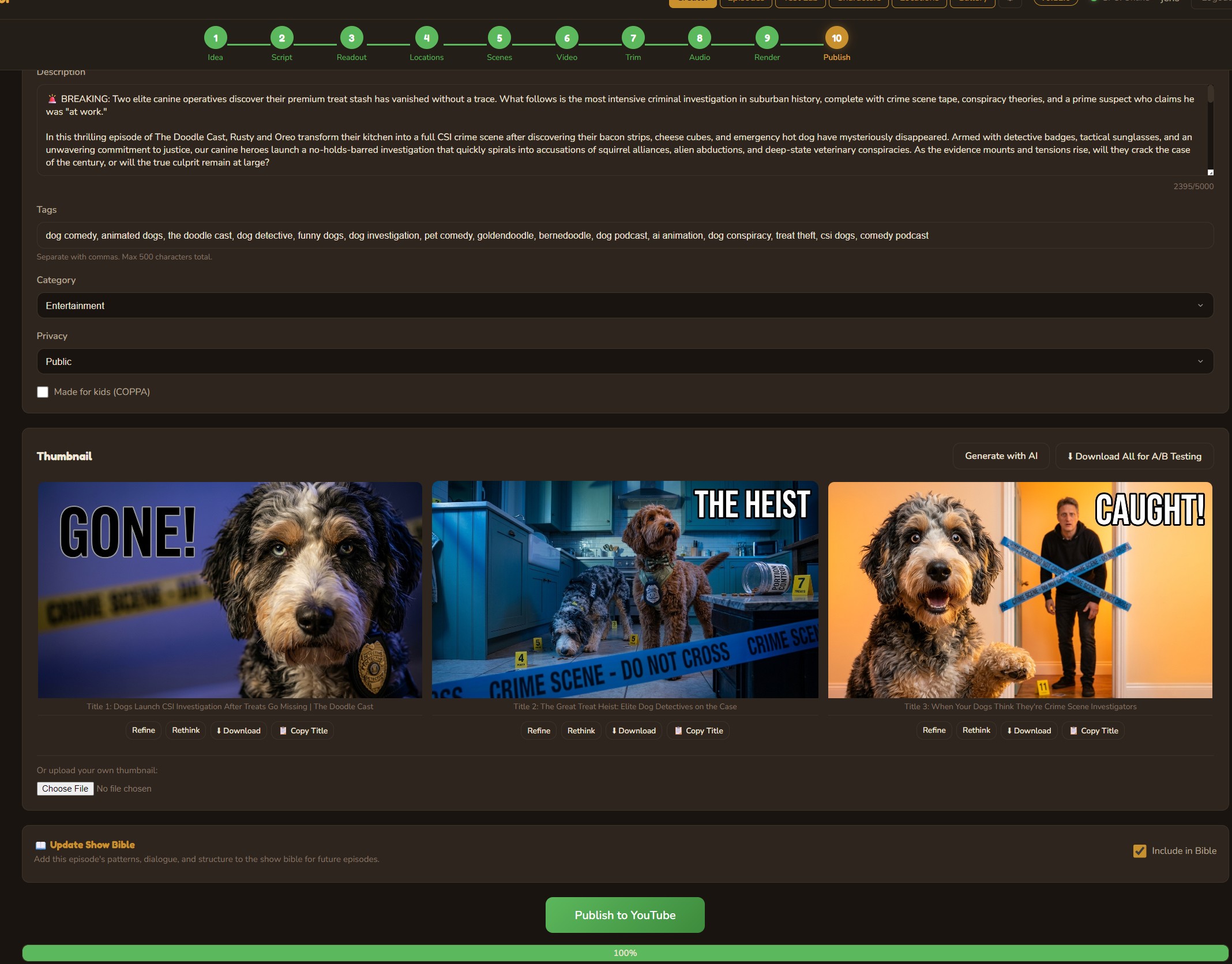
Generate multiple AI thumbnails for A/B testing, write metadata with Claude, set tags and categories, then publish directly to YouTube — with real-time upload progress. The show bible automatically evolves after each published episode, learning what works for future content.
Configurable LLM models per step
v1.1 made every creative stage independently model-pickable. Episode Ideas can run on Gemini Flash, Episode Scripts on Claude, Shorts Ideas on a local Qwen3, all in the same project. Persisted to user preferences and surfaced in a dropdown next to each step.
Per-step model picker on every creative surface. Local pool (Qwen3:32B / Qwen3:8B / Gemma3:27B / Gemma3:12B) plus cloud (Gemini, Claude). v2.1 extended this with a routing bridge that runs admin Gemini and Claude calls through local tooling when the GPU is online.
Mid-episode model swaps. The same project might brainstorm on cloud and script on local; the show-bible context has to load identically into both. The bridge layer normalizes input and output across providers so calling code never branches on model identity.
Quality dropped briefly when Idea Lab defaulted to Qwen 8B and the show-bible context spilled out of the window. Output went generic. The llama-swap router now picks the largest model that fits the prompt + still fits in VRAM with whatever else is warm.
Cost per episode dropped substantially once brainstorming defaulted to local. Quality stayed where it was. The "live routing indicator" in the topnav was added later in v2.1 because it was no longer obvious from the bill which engine had run which step.
Episode & Shorts Ideas
Choose from Gemini 2.5 Flash, Qwen3:32B, Qwen3:8B, Gemma3:27B, Gemma3:12B, or Claude. Local models run on the RTX 5090; cloud models deliver higher quality for production batches. The model selector appears directly in the Idea Lab.
Episode & Shorts Scripts
Script generation supports the same model selection. Each model brings a different narrative style — Gemini excels at concise dialogue, Claude at long-form structure, and local models at rapid iteration.
Local Routing Bridge
When the local GPU is online, an LLM bridge routes admin Gemini and Claude calls through local tooling rather than the cloud APIs. Multimodal calls (image-grounded analysis like the guest-submission photo pass) route the same way. Calls fall through to the standard cloud route when the bridge is unavailable, so behavior is identical from the caller’s perspective.
Live Routing Indicator
A compact status indicator in the topnav shows whether LLM calls are routing local or cloud at a glance. Hover and a popover breaks down the actual provider and model per active callsite, so it is obvious at any moment which engine is doing which job.
9:16 vertical batches alongside the episode pipeline
v1.1 added a parallel pipeline for vertical short-form content. Eight shorts at once from a single theme, each with unique characters, AI-generated images and video, voice synthesis, and music — then published across five platforms with scheduled auto-publish.
Batch creation, per-batch scheduling, multi-platform publish (YouTube Shorts, TikTok, Reels, Facebook, X). Reused the v1.0 publish surface so the calendar and analytics work didn’t need to be re-implemented.
Per-clip image-to-video timing alignment. Each clip is independently rendered then concatenated, and clips with slightly off frame counts caused cumulative drift across the batch. Same fix as v1.0: integer-frame accumulation everywhere.
TikTok upload failed silently for two days because the token-rotation cron didn’t fire on weekends. Errors landed in a swallowed try/catch. Added a watchdog that pings each platform’s upload endpoint hourly and emails on failure.
Shorts now ship more reliably than episodes (smaller surface area, fewer moving parts). Sharing the publish/calendar surface across episode + shorts saved roughly two weeks of duplication that v1.0 had warned about.
Idea Lab
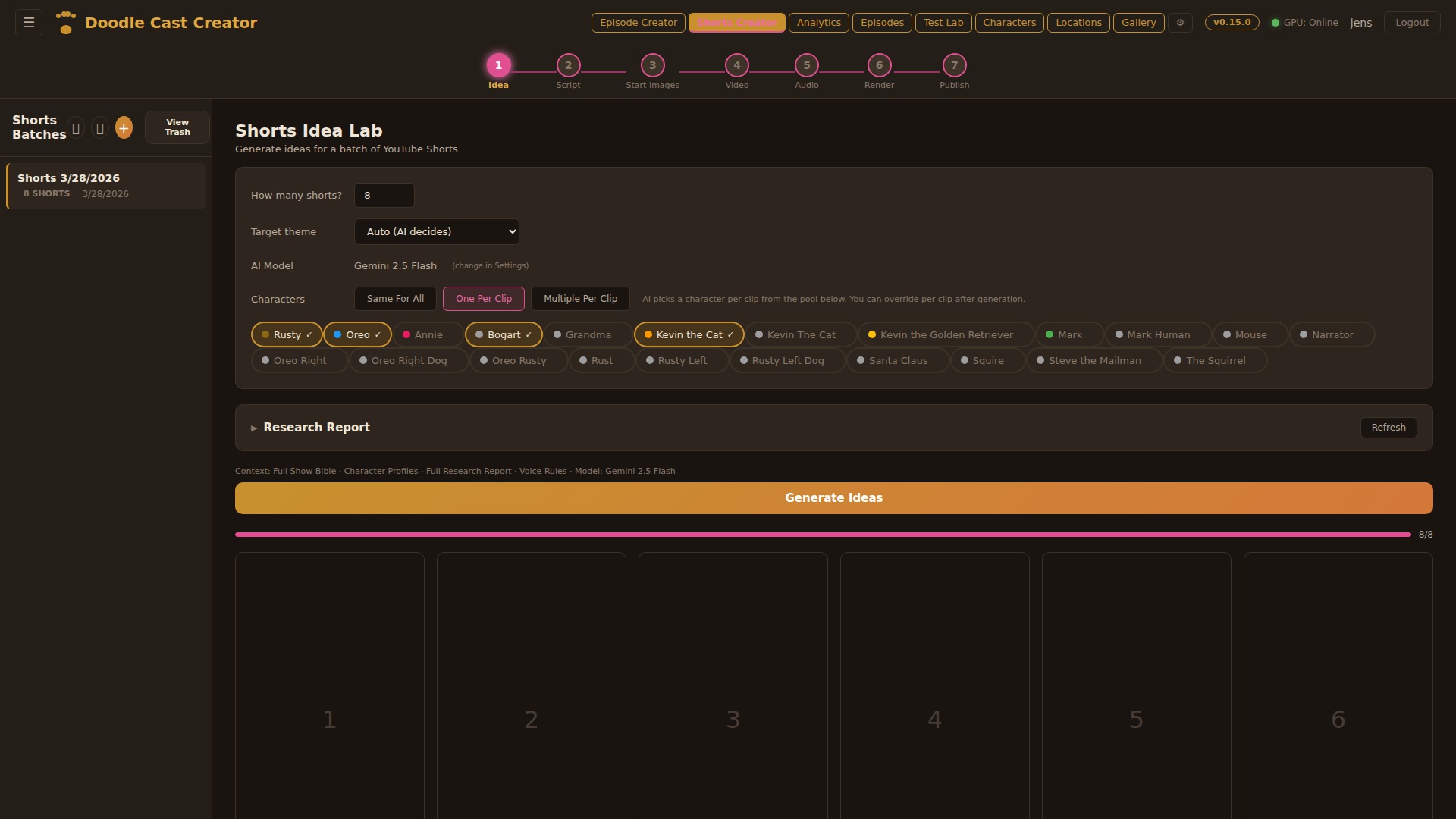
Generate up to 8 short ideas at once from the show’s character pool. Choose the AI model (Gemini Flash, Llama, Gemma, Qwen, or Claude), assign characters per clip or let the AI decide, and feed in a YouTube research report for topical relevance. Each idea gets a title, hook, concept, and character assignment — all in one batch generation.
Script Writer
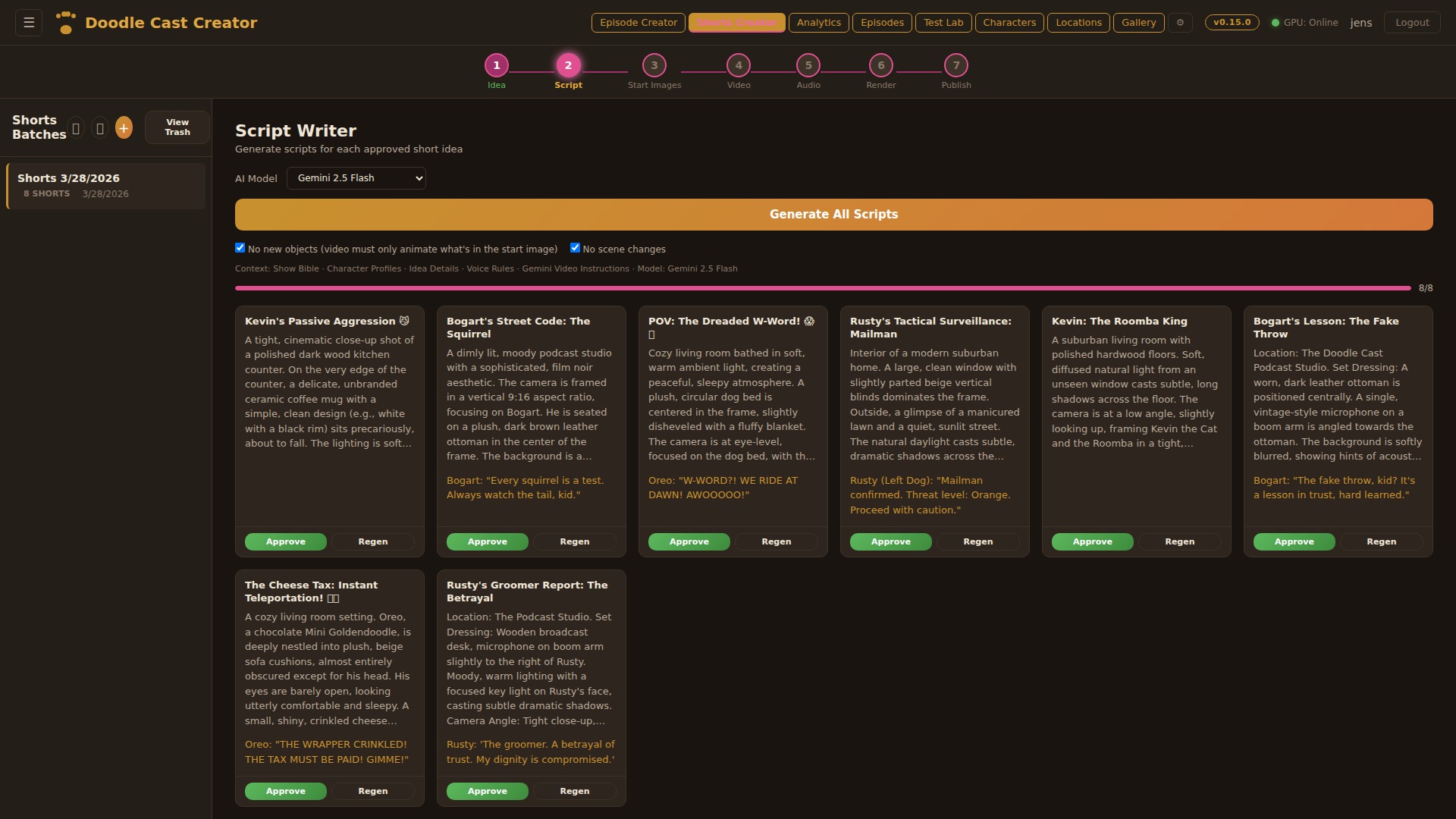
Generate scripts for all clips in batch. Each script includes a scene description (for the still image), character description, video action prompt (for I2V animation), and 8–12 word dialogue. Rules enforce no new objects mid-scene and no scene changes — keeping each short visually coherent for image-to-video generation.
Start Images
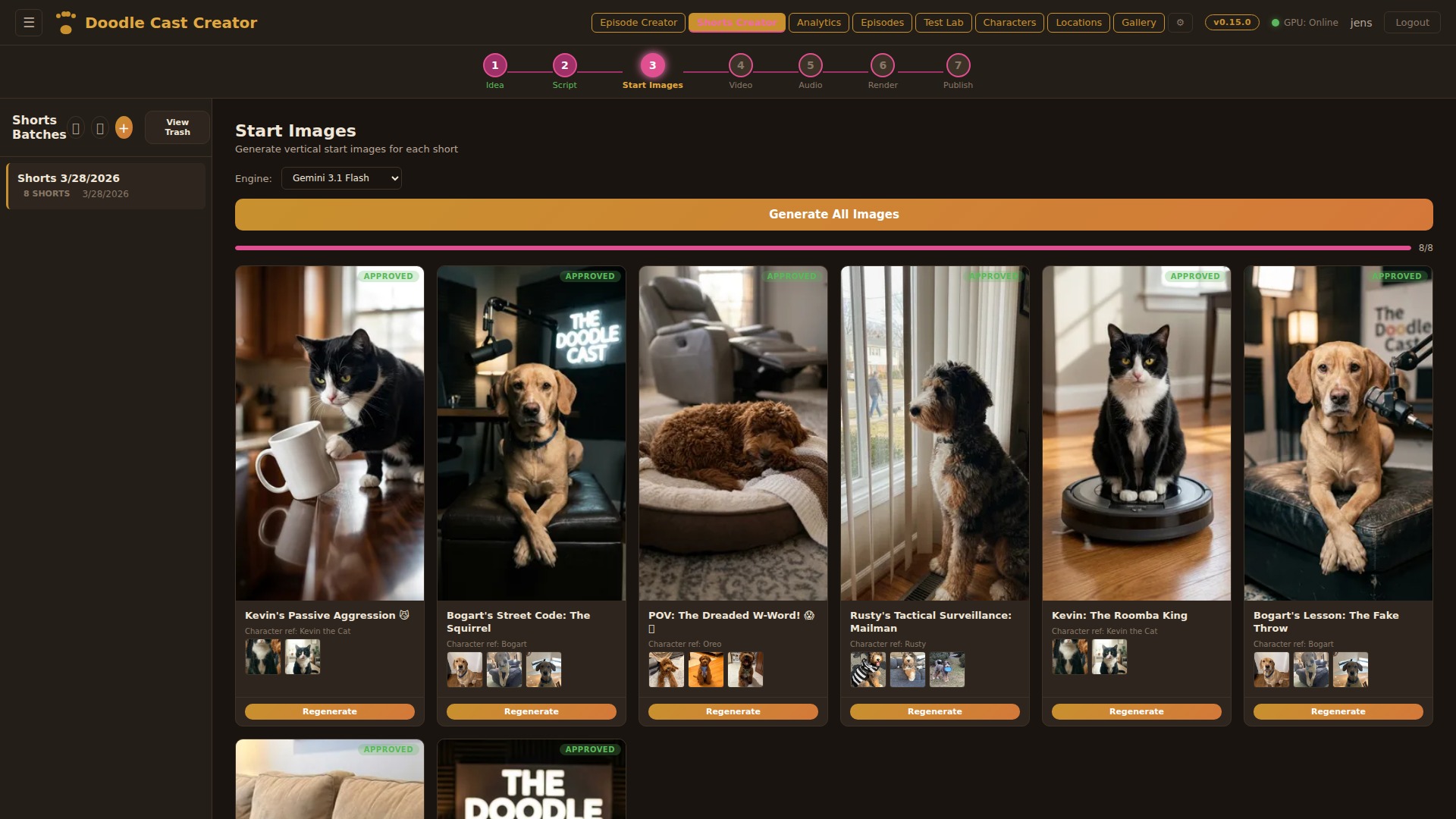
Generate the starting frame for each short using AI image models. Choose between Gemini, Z-Turbo, SDXL, or Qwen — each producing photorealistic 9:16 vertical images informed by character reference sheets and scene descriptions. Full image history with undo and per-clip regeneration.
Video Generation
Transform each starting image into an 8-second animated clip using image-to-video models. Google Veo for production quality, or WAN 2.2 / LTX on the local RTX 5090 for free iterations. The video action prompt from the script drives the animation — subtle movements, camera pans, character expressions.
Voice Studio
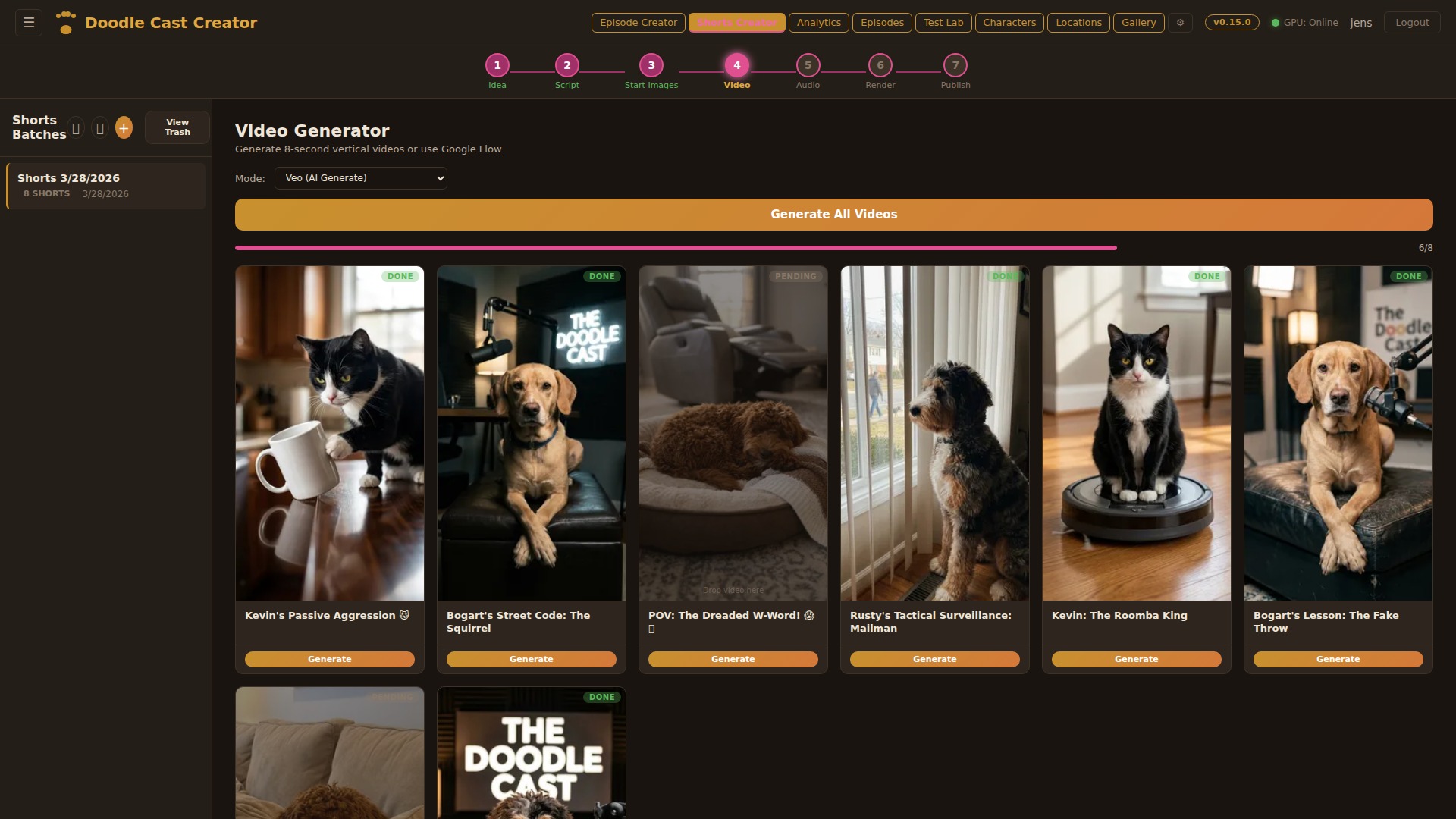
Replace audio with character voices using ElevenLabs. Each short gets a multi-track audio view: original video audio, per-character voice tracks, and AI-generated background music. Batch-replace all voices with one click, or fine-tune individual clips. Music generation creates custom background tracks that match each short’s mood.
Render Engine
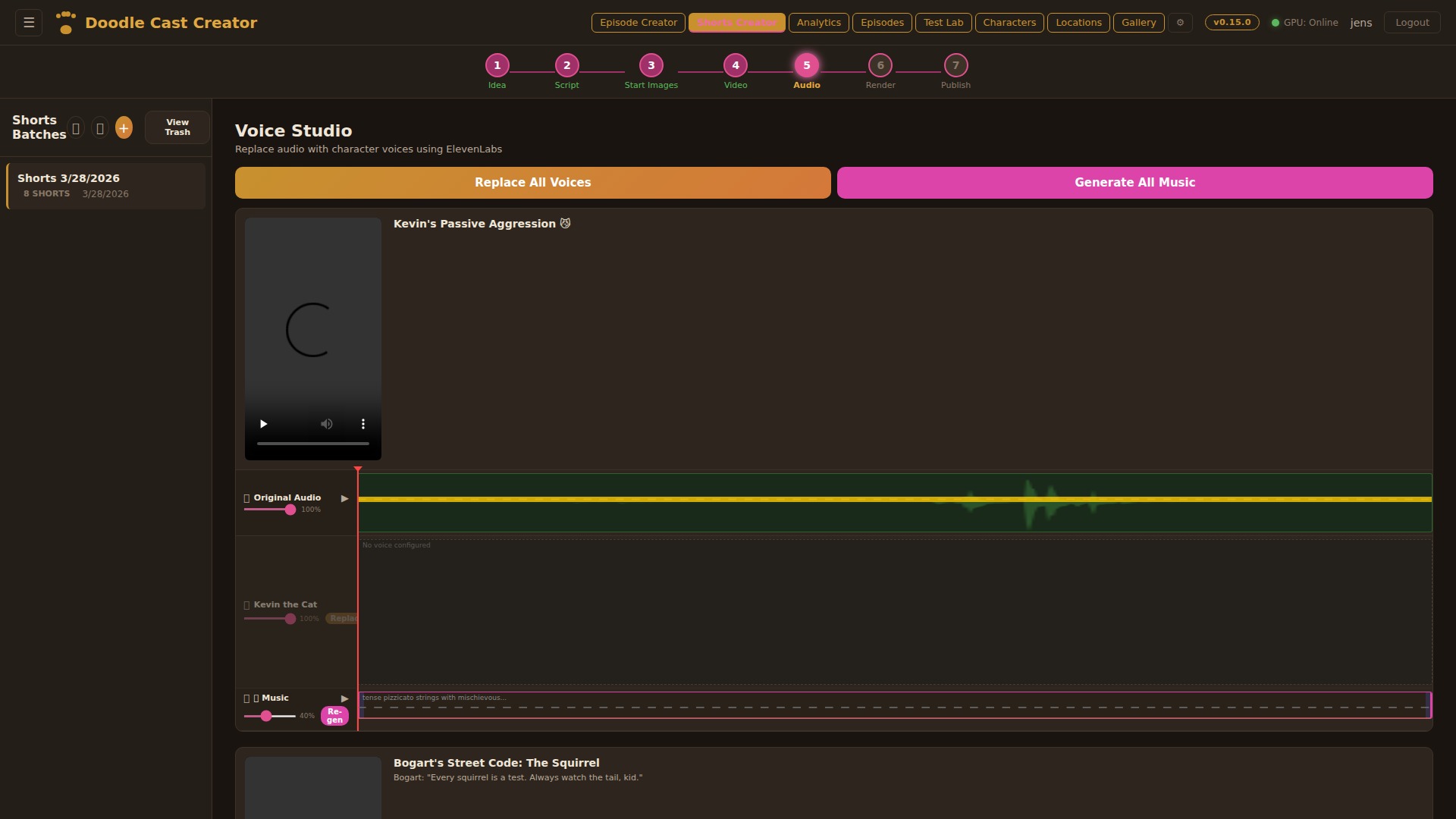
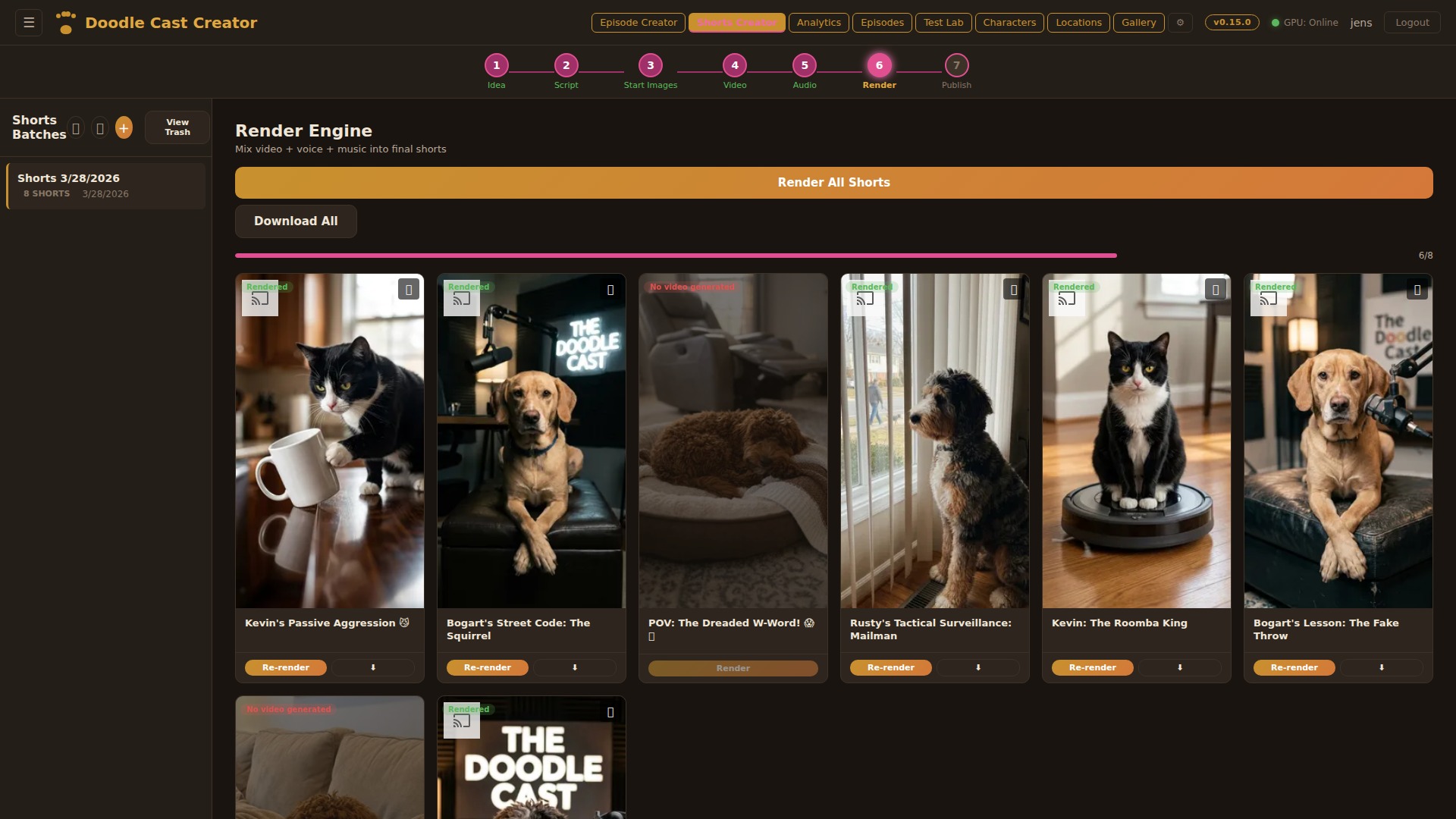
Mix video, voice, and music into final MP4s using ffmpeg. Each clip gets independent volume control for original audio, voice, and music tracks. Render all 8 shorts in one click or selectively re-render individual clips. Output uploads to Google Drive automatically and is available for immediate download.
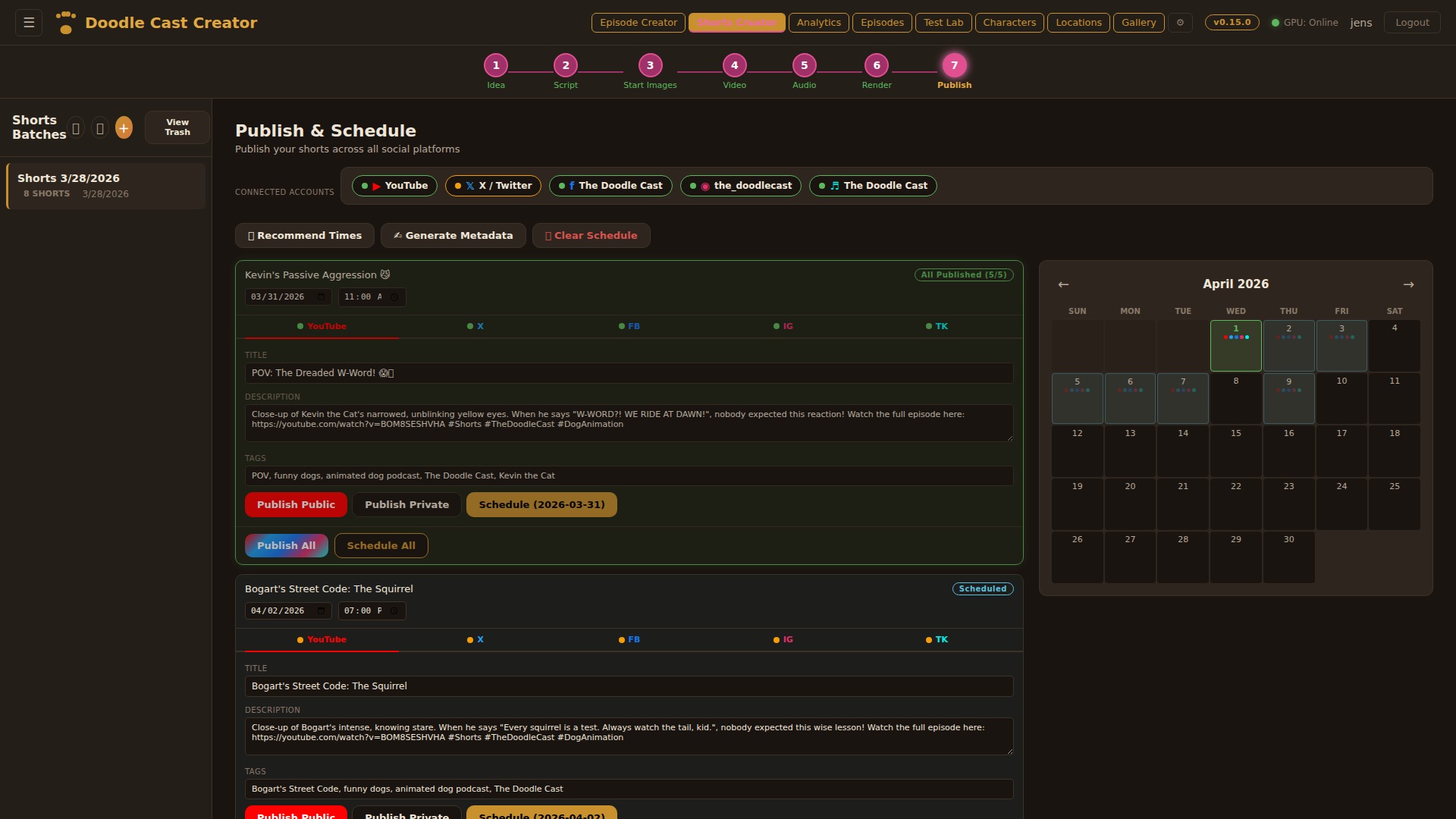
Publish & Schedule
Publish shorts to YouTube, Facebook, Instagram Reels, TikTok, and X (Twitter) from a single dashboard. Each platform has its own tab with OAuth authentication, AI-generated metadata, and publish controls. Schedule posts with a visual calendar, get AI-recommended posting times based on channel analytics, and let the auto-publisher fire at the right moment. Missed schedules trigger email alerts.
Audio-only feed using the same characters
v1.2 added an audio-only podcast pipeline using the same characters and show bible as the video pipeline. Multi-voice dialogue, AI cover art, and direct publishing — a complementary audio feed alongside the YouTube channel.
7-step audio pipeline. Same script writer as video, different render path: per-character ElevenLabs voice synthesis, mix, podcast cover art generation, RSS publish.
Per-speaker volume balancing. Each character voice has different inherent loudness from ElevenLabs; concatenating without normalizing produced “listen on headphones” hot spots. ffmpeg loudnorm now runs per-clip before mix, with a final pass after.
RSS feed had per-episode artwork URLs that were absolute to the dev domain. First publish to Apple Podcasts threw 404s on every cover. Now resolved through a CDN-aliased path that’s identical across environments.
Quickly became the format for material that doesn’t need visuals (interviews, monologues, behind-the-scenes). The surgical isolation of “video paths” vs “audio paths” was easier than expected because v1.0 had already separated them at the manifest level.
Podcast Idea Lab
Three modes: AI-recommended pitches with Grok scoring, bring your own idea, or Research & Debate with live web research. Scripts include multi-character dialogue with ElevenLabs voice directions and configurable target length (2–120 minutes).
Multi-Character Script
Full conversation scripts with character dialogue, word count tracking, and duration estimates. Choose your LLM (Grok 4, Gemini, Claude, or local models) and generate scripts grounded in the show bible for character consistency.
Script Preview & Publish
Full episode preview with character avatars, color-coded dialogue, and a sidebar listing all podcast episodes. Review the complete conversation flow before committing to voice generation and audio production.
Multi-Voice Dialogue
ElevenLabs Text-to-Dialogue API generates natural conversations between multiple characters in a single audio stream. Each character maintains their unique voice profile with proper conversational pacing and turn-taking.
Audio Production
Auto-generated intro/outro music, configurable silence gaps, act-based script batching for long episodes (15+ minutes), and target duration control. The pipeline produces publish-ready audio without manual editing.
AI Cover Art
Generate up to 4 cover art variants per episode using Gemini, informed by character reference images and episode context. Pick the best one or regenerate.
7-Step Pipeline
Pitch → Script → Voices → Cover Art → Audio Mix → Preview → Download & Publish. Each step builds on the last with full state persistence across reloads.
Manual generation in flow.google.com without losing automation
v1.2 added the Google Flow workflow: any video step that wants manual generation in flow.google.com can stage assets to Drive, generate externally, and upload the MP4 back. Now used by Shorts, the Episode Pipeline, and Guests — the manual-in-the-loop backbone for v2.1.
Three-step Flow surface: server bundles start frame + prompt to Drive, operator generates manually, uploads MP4 back. Plus a dual-source image watcher (Drive polling + browser File System Access API) so iPad drawings and local PC folders feed the same approval queue.
Round-tripping arbitrary frame counts. Flow output isn’t always exactly 8.000s; the trim editor has to clip to integer-frame boundaries without re-encoding. -c:v copy with a -t flag computed from the manifest’s frame count works.
Drive polling stopped seeing new files because the OAuth token silently expired and the refresh path swallowed the failure. Two days of operator confusion before a watchdog caught it. Refresh path now logs and the topnav shows a Drive-disconnected indicator.
Became the v2.1 backbone for Guest Submissions and Shorts-from-Podcast: any time the right move is “a human generates this externally,” the Flow surface absorbs that without breaking the rest of the pipeline.
Dual Source Monitoring
Google Drive polling (every 10s) for iPad-sourced images plus browser-based local folder watching (File System Access API) for PC files. Both feed into the same approval queue with LED status indicators.
Approval Workflow
Every detected image queues for visual approval: side-by-side comparison of current vs. new image, with options to set as start image, end image, or discard. A visual clip picker grid allows reassigning to any scene.
Start & End Images
Each scene now supports separate start and end frames for image-to-video generation. Swap, edit, or AI-modify either image independently. The video engine uses both to produce smoother motion between key frames.
Drive Export
Export character references, location images, and scene references to Google Drive per clip — creating organized folders for external AI tools or team collaboration.
Grok 4 deep-research scripts for fact-heavy episodes
v1.2 added a deep-research path on the Creative Director step: three brainstorming personas debate, a judge with live web search picks the winner. For news-cycle episodes (the Gazette format) that need current information rather than show-bible-only content.
Three-persona debate (skeptic, optimist, story-finder) in parallel, judge model with live web search picks the winning angle. Selectable per episode.
Latency. Grok’s deep-research mode runs 60 seconds per call; three-way debate plus a research-grounded judge can take 6 minutes on news-heavy material. The UI streams each model’s progress so the operator can feel forward motion.
Grok kept hitting a 60s timeout in the bridge layer. Episodes silently fell back to a non-research path and the operator only noticed because output went generic. Bumped to 240s and added a UI banner when fallback fires.
Used selectively rather than by default. Most evergreen episodes don’t need it; news-cycle Gazette episodes lean on it heavily. The cost-quality tradeoff is per-episode.
Live Web Research
Grok 4 searches the web in real-time for the episode topic, pulling current facts, statistics, and developments. The research context is injected directly into script generation for factual accuracy.
Debate-Style Dialogue
Characters engage in informed discussion with real data points. The show bible context ensures characters stay in-character while discussing factual content, producing educational yet entertaining scripts.
Fire Hydrant Gazette — late-night news comedy as a segment template
v1.3 introduced an extensible segment template system. Each template defines format rules, comedy mechanics, joke formulas, and visual style; the AI script writer reads the template alongside the show bible. Fire Hydrant Gazette was the first template; more followed.
Segment template system, character-positioned OTS graphics with live-preview sliders, intro videos per segment type, Discord auto-announce on episode publish.
4:3 OTS graphic composition over a 16:9 video frame. Anchor points had to stay tied to the character’s screen position even when the camera moved. Solved with a per-segment fixed-anchor map keyed to the character’s on-screen position rather than the absolute frame.
Cache-hash invalidation didn’t include the intro-video flag, so toggling it off didn’t re-render. The previous frame composition kept playing. Cache key now includes intro presence.
The Gazette format alone justified the v1.3 effort. Discord auto-announce was 2-day work and saved minutes per publish. The template system later grew to host more segment types without further plumbing.
📰 Segment Templates
Extensible segment type system. Each template (e.g. The Fire Hydrant Gazette) has its own format rules, comedy mechanics, 12 joke formulas distilled from classic news-desk comedy, voice profiles, guest correspondent arcs, and a dedicated comedy bible layer. Templates are code-canonical and upsert on boot.
🎬 OTS News Graphics
Character-positioned over-the-shoulder graphics, matching real news-desk broadcasts. Rusty sits left → OTS on the right. Oreo sits right → OTS on the left. Configurable X/Y/Width per segment type with live-preview sliders. 4:3 landscape ratio. Composited in the final render via ffmpeg overlay filter on both VPS and GPU paths.
🎧 Audience Reaction Track
Comedy segments get per-template audience reactions — 9 types (laughter, big_laugh, giggle, applause, ooh, aww, groan, cheer, signoff) tuned to an SNL Weekend Update dry-desk profile. Dedicated Audience Plan step, density dial, multi-take stem library, lane-packed timeline, signoff-into-outro bleed. Full deep dive in the workflow article.
🎤 Per-Segment Intro Clips
Each segment type can have its own intro video (uploaded in Settings, toggle on/off). Appears in the timeline with a cyan border, included in HLS, VPS fallback, and DaVinci export render pipelines. Cache hash includes intro for invalidation.
📡 Discord Auto-Announcements
New episodes, shorts, gazette articles, and podcast episodes are automatically posted to the fan Discord server via an internal HTTP announce API. Non-blocking hooks — publish failures never block the response. 6 distribution channels now: YouTube, Facebook, Instagram, TikTok, X/Twitter, and Discord.
🖼 Scene Image Enhancements
Gallery picker on empty scene slots. Drag-to-copy images between clips in the timeline (chain-draggable). Per-clip topic image toggle (show/hide OTS graphic). Image history with undo. Topic images visible across scene thumbnails, video timeline, and start/end frame previews.
🎭 Comedy-First Script Instructions
Rewritten comedy bible based on research from professional late-night comedy writers. Kill-your-first-thought rule, write-30-keep-5 method, punchlines-pivot-away principle, factual setups, and tight two-line joke structure. Static camera instruction for news desk realism.
📷 Real Web Photo Picker
Brave Image Search API for sourcing real news photos as OTS graphics. Choose between AI-reimagined versions or real photos as-is. Photo credit metadata captured for on-screen attribution. Replaced DDG scraper (ToS violation).
Studio 8H in a database — the audience reactions pipeline
The Fire Hydrant Gazette is a news-desk comedy segment. News-desk comedy needs an audience — but not a sitcom laugh-track audience. The reactions layer is modelled on the SNL Weekend Update dry-desk feel: the audience sits silent while the anchor delivers, then lands one clean wave in the post-speech silence.
Script-writer gate that decides when reactions are even appropriate. Multi-model planner that picks reaction TYPE (laugh, oh, hush, applause). Stem library with multiple takes per type. 9th “signoff” reaction that bleeds into the outro. Audio editor with lane-packed timelines so the operator can manually retime when needed.
Knowing when to react. The script doesn’t say “audience laughs here.” A small classifier reads each clip’s dialogue + tone and infers reaction type with timestamp. The non-trivial decision is silence: knowing when NOT to react is harder than picking which reaction.
Stem library kept hitting the same take in a row, which is the tell of a fake audience. Picker now tracks recently-used takes per type and avoids repeats within a window.
The audience layer makes a mediocre joke land. It also makes a flat one ROT, in slow motion. Operators learned to disable reactions on weak material rather than try to mask it with the audience.
🎪 Weekend Update profile
Reactions land in post-speech silence only — never mid-speech, never during word-gaps. One reaction per clip maximum. Target mix: laughter ~45%, groan ~15%, ooh ~15%, applause ~10%, big_laugh ~8%. Desk lines, not sitcom stings. Locked in the prompt as hard rules.
🎸 9 reaction types
laughter · big_laugh · giggle · applause · ooh · aww · groan · cheer · signoff. Duration clamped 0.3–6s at insert time. Extended types (chuckle, snort, gasp, mmm) kept in reserve for texture, not mid-speech spam.
🎱 Density dial
Sparse (25–35% of comedy clips), medium (50–65%), dense (75–90%). Persisted per-episode in audio settings. Controls SHARE of clips that get a reaction — not stacking depth. Stacking is forbidden.
💻 Multi-take stem library
Each reaction type has N flavor descriptors (laughter: 8, applause: 6, bed: 6). Same cue deterministically picks the same variant via seed hash, but different rows spread across the variant pool. Kills the canned laugh-track feel.
🔊 Natural tail bleed & pitch roll
Non-bed reactions play 2s past clip boundary so tails feel present. ±3% playbackRate roll per play for pitch+speed variety. Bed tone exempt from both — a continuous low-gain studio room tone loops under the whole episode at ~0.12 gain.
🎧 Audience Plan step
Dedicated button (separate from auto-script-gen). Transcribes the episode on the local GPU host, then asks an LLM — a local model first, Claude or Gemini as fallbacks — to place reactions on the trimmed timeline. Additive: preserves existing non-bed rows.
📥 Signoff into outro
A 9th reaction type that carries the goodbye past the final clip into the outro logo. 18s dedicated slot, broadcast-loud sustained applause+whoop+cheer blend. Outro re-encoded via ffmpeg amix with 0.2s fade-in + 2s fade-out at t=4s.
🧠 Studio 8H acoustics
Every stem prompt locked to a shared acoustic descriptor: ~285-seat NBC Studio 8H, woven linen ceilings, intimate dry acoustics, close broadcast house mic. No reverb tail. No individual voices popping. TV-behaved collective reactions only.
📈 Lane-packed timeline
Overlapping reactions split into extra visual lanes in the audio editor (greedy interval-scheduling). Lane 0 keeps mute/volume controls; extra lanes get a “↓ Audience N” label. Same pattern now applied to SFX and music tracks.
Further reading: The full workflow — from script-writer cue generation through the Audience Plan LLM chain, stem catalog, render pipeline integration, and the outro-bleed trick — is written up in the Audience Reactions Workflow article on overdigital.ai.
Anti-slop hardening, retention feedback, and locking what’s already live
By April the pipeline had 24 steps. The next round wasn’t new pipelines, it was hardening the existing ones. YouTube was actively penalising detected AI content. Scheduled and published clips were occasionally getting edited or regenerated by accident. v1.5 fixed both axes: channel-defense and editing-safety.
Anti-slop hardening across every image-gen call. Burned-in TikTok-style large-bold captions. Top-level calendar with retention drill-down. Lock-for-editing on scheduled and published clips. Opt-in scheduler with confirm-on-publish.
The retention feedback loop. YouTube analytics aren’t real-time — there’s a 48-hour lag. The loop pulls retention curves into the calendar drill-down popover and uses them to flag scenes for re-cut. Required a separate analytics ingest plus popover positioning that survives screen edges.
A retention curve clipped through the popover boundary and bled onto the rest of the calendar. Cosmetic, but it kept slipping back across two refactors before the popover got a hard z-index seal and clip-path containment.
“Anti-slop” became a recurring lever. Every new feature now gets the question: does this make slop more or less likely? Sometimes the answer is to NOT ship it.
🛡️ Universal anti-slop hardening
Every image-generation call — characters, locations, podcast covers, topic images, scene references, saved-idea portraits — runs through the same shared anti-slop instruction set. Forbids the visual signatures YouTube’s detector pattern-matches on (uniform shading, plastic skin, neon-rim glow, generic-fantasy lighting). Real-photo character references preferred over generated ones where possible.
📢 Burned-in captions
ASS subtitle file built from clip dialogue with timing pulled from the trimmed audio track. Baked into the render via ffmpeg’s subtitles filter (forces re-encode — can’t pass through with stream copy). Captions survive every cross-platform repost; no more relying on YouTube’s auto-captions.
📊 Retention feedback loop
Per-second YouTube retention curves (the 100-bucket audienceWatchRatio array) pulled from the YouTube Analytics API and stored locally. A channel-aggregation service rolls the curves into a prompt block that gets injected into the next round’s idea-generation and script-generation calls (“avg drop at 4s — tighten dialogue at the second beat”).
🗐️ Static-pose start frames
Start-frame prompts now lock the character pose so the end frame can move. Kills the “swimming character” look where image-to-video models interpolate between two slightly-different stances. Theme propagation also runs through idea-generation, script-generation, and script-regeneration so the chosen target theme actually shapes every stage instead of just the first.
📅 Top-level calendar
Month-grid view of every scheduled and published short and episode across all platforms. Drag-drop to reschedule, drill-down per-clip with retention curve SVG, hover preview with player controls, fullscreen video. Reachable from every page so the calendar icon is always one click away. Cancel/unschedule from inside the drill-down without bouncing out to the publish step.
🔒 Lock for editing
Once a clip is scheduled or published it’s locked. UI gates and server-side guards refuse mutations on schedule, metadata, platforms, schedule-all, and image regeneration unless the batch is explicitly unlocked. The unlock flow is single-session and explicit, so you can’t accidentally re-render last week’s short.
📅 YouTube native scheduler (opt-in)
Two publish modes coexist. Default: the in-app auto-publisher uploads at the scheduled time as a public video. Opt-in: per-clip “Schedule on YT” or batch “Schedule All on YouTube” uploads as private with a future publishAt, so YouTube owns the queue server-side and the clip shows in YT Studio’s scheduled list.
🎤 Voice summary field
A new tight 1-2 sentence voice description per character — used in image-to-video prompts and the export instructions. Falls back to the longer speech-style guidance when not set, so existing characters keep working. Long speech-style guidance no longer dilutes a focused video prompt.
⏳ Fire-and-poll for long jobs
Drive exports, batch retention pulls, and other long-running operations switched from synchronous requests to a fire-and-poll job pattern. Cloudflare’s free tier kills synchronous requests past ~100s, breaking the original flow. The job pattern starts work, returns a job id, and the UI polls until done.
Why this matters: Most AI-generated YouTube content is bleeding traffic to YT’s detector while authors keep regenerating into already-live clips. v1.5 closes both wounds at once — the channel defends itself against the AI-slop signal, and the editor surface defends already-published work from accidental rewrites. The retention feedback loop turns each published short into a training signal for the next batch, so the channel gets sharper every round.
DaVinci Resolve as the human-in-the-loop layer
Showspring renders broadcast-quality MP4s end-to-end on the VPS. But sometimes a producer wants to nudge a single beat, or the AI’s timing instinct is 90% right and a human editor needs to push two clips fifteen frames left. v2.0 ships the entire timeline into DaVinci Resolve through a five-level integration ladder, all consuming a single canonical JSON contract and a portable OTIO bundle.
Five-level integration ladder (OTIO bundle → Lua importer → Python tray daemon → outbound WebSocket → Workflow Integration panel) on a single canonical JSON manifest. Frame-accurate timeline accumulation. ProRes 4444 stills. Markers carrying opaque Showspring identifiers for round-trip.
Volume duality. OTIO has no native audio-levels schema. Volumes ship on two channels: per-clip OTIO metadata embedded in the timeline, plus a volumes.json sidecar. Daemon applies via Resolve’s undocumented TimelineItem.SetProperty("Volume", dB) with the sidecar as recovery when SetProperty no-ops on certain Studio builds.
Windows Defender flagged the first daemon as a remote-control toolkit because PowerShell tray-icon code matched a heuristic. Rewrote in Python with pystray. Then Python’s stdlib HTTP server hung on Content-Length mismatches; switched to a leaner ASGI runner.
The OTIO contract is now load-bearing across the whole product. Round-trip via markers is infrastructure-ready — the next step is reading editor changes back into the database. Markers are stamped, Resolve’s GetMarkerByCustomData() works, the wire is up.
📄 Single manifest contract
Every consumer reads the same versioned JSON manifest — clips, durations in frames, kind, tracks, ordered items, volume keyframes. Never references absolute paths, so the same bundle unpacks anywhere. Stamps opaque Showspring row identifiers into Resolve markers for the future round-trip flow.
🍾 Five levels of integration
Level 0 server-side OTIO bundle (NLE-agnostic). Level 1 Lua importer (free Resolve). Level 2 local Python daemon bound to loopback only. Level 2.5 same daemon, outbound WebSocket back to Showspring. Level 3 Workflow Integration panel inside Resolve. Each level is a complete shipping path on its own.
📦 Portable OTIO bundle
Built entirely on the VPS. Frame-accurate accumulation walks the timeline as integer frames so an 8-minute episode doesn’t drift. ProRes 4444 stills for image overlays. A volumes.json sidecar so non-Resolve NLEs can recover audio levels. Image-sequence detection defeated by giving overlays alphabetical-only IDs.
🔒 Two delivery channels
Authenticated download for the user’s browser session. An unguessable one-time token for the local daemon (no session cookie possible). Token minted at build time and discarded on re-export.
💻 Python tray daemon
Long-running Windows tray process. pystray for the icon (replaced PowerShell after Defender heuristics flagged the script as a remote-control toolkit). Polls a local health endpoint. Three states: ok / warn (Resolve unreachable) / down. Owns the outbound WebSocket too.
🎯 Volume duality
OTIO has no native audio-levels schema. Volumes ship on two channels: per-clip OTIO metadata embedded in the timeline, plus a volumes.json sidecar in the bundle root. Daemon applies via Resolve’s undocumented TimelineItem.SetProperty("Volume", dB), with the sidecar as the recovery path when SetProperty no-ops on certain Studio builds.
🔗 Round-trip via markers
Every clip in the bundle ships with a Resolve marker carrying an opaque Showspring identifier in its custom_data field. Resolve’s GetMarkerByCustomData() call lets a future flow walk an editor-modified timeline, recover the IDs, diff against the original, and write timing changes back to Showspring’s database. Infrastructure shipped; the round-trip flow is next.
🛠 Resolve API survival kit
recordFrame is absolute (offset by GetStartFrame()). CreateEmptyTimeline collides on name. DeleteTimelines is a no-op (use DeleteClips). SaveProject() mandatory or work evaporates. 1V/1A default needs AddTrack before high trackIndex. Integration code wraps each gotcha so the upstream call sites stay clean.
Further reading: The full story — the manifest contract, the tempfile-trap that broke the first daemon, the Content-Length hang in Python’s stdlib HTTP server, the Defender false-positive that forced the rewrite, and the “don’t kill the tray” self-kill bug — is written up in the Building the DaVinci Resolve Integration deep-dive on overdigital.ai.
From a pitch email to an approvable preview
Running a recurring cast means fielding pitch emails and DMs from fans whose pets want in on the show. The Guests inbox is the admin tool that turns those one-off messages into a structured production workflow without a separate spreadsheet or a back-and-forth thread.
Two-pass LLM analysis (text first → characters and observations; photos second → personality summary with explicit additions-beyond-text delta + image descriptions + episode-idea seeds). ElevenLabs voice finder. Per-dog Google Flow video workflow. Speech-to-Speech voice replacement. Approvable public share link.
Voice-replace artifact compounding. Initial implementation read source audio from the most recent video, ran Speech-to-Speech, muxed the result back. Re-running compounded artifacts because each pass read its own previous output. Now reads from an immutable raw upload on every run.
The voice finder kept returning “no matches” on perfectly reasonable voice-direction prose because the LLM-extracted filters were over-restrictive. Added a progressive relaxation chain that successively widens until candidates appear; gender selector keeps the operator’s constraint hard.
Validates the v1.0 prediction: a NEW production mode is multiple weeks of work even when most components exist. Two-pass analysis schema, Drive folder bundling, ElevenLabs library cloning, Speech-to-Speech mux — each existed in fragments, none integrated.
📝 Two-pass character extraction
The first pass reads the submitter’s raw text and extracts a per-dog character profile: name, breed, three-to-five-sentence personality, voice direction, and a granular observation list grounded in the submitter’s own wording. The second pass — multimodal — reads the reference photos, validates and enriches each profile, and assigns each photo to the right dog in a multi-pet submission. The two passes write into the same record independently, so photos can land after the initial analysis without losing anything.
🔹 Personality delta from photos
The photo pass produces a tight personality summary in the same shape as the text-only pass, plus an explicit “additions beyond the text” list — observations the photos surface that the text summary did not already cover. An empty additions list is meaningful: photos confirmed but did not add. The pass is forbidden from restating the text back, so the operator can scan the delta in seconds rather than reading two summaries side by side.
🎤 Voice finder + library clone
Click “Find voice” on a dog and the app maps the dog’s voice direction onto the available ElevenLabs voices. An LLM converts the prose into structured search filters (gender, age, accent, descriptives), then a progressive-relaxation chain widens the filter set until candidates appear. Up to six cards render with identity chips, a description, and an audio preview; picking one clones the voice into the operator’s account and writes the new voice ID back to the dog record in a single round-trip.
🎞 Google Flow video workflow
Same three-step Flow flow already in the Shorts pipeline: prepare assets in Drive, generate the clip in Google Flow, upload the rendered MP4 back to Showspring. State machine in the dog card walks the operator through Step 1 / Step 2 / Step 3 with a status pill so the workflow never feels open-ended.
🔈 Speech-to-Speech voice replacement
Once a Flow video is uploaded, the operator clicks “Replace voice”: the original audio is extracted, sent through ElevenLabs Speech-to-Speech with the dog’s voice ID, and muxed back into the video. Source audio is read from the immutable original on every run, so re-replacing never compounds artifacts across passes — a regression caught and fixed during build-out.
🔗 Approvable share link
When the draft looks right, the operator approves the submission. Approval mints a public share link the submitter can open without logging in — they see their dog’s portrait, hear the voice hello, and watch the six-second video preview. Revoking approval takes the link down immediately. Promoting the submission seeds an episodes row with the concept and makes the character visible in the main character pool.
Long-form podcast in, vertical highlights out
The standard Shorts pipeline generates original animated clips. This surface does the opposite: take an existing long-form podcast episode, find the highlights inside the conversation, and produce 9:16 vertical shorts ready to publish — without leaving Showspring.
Long-form podcast in, 9:16 vertical highlights out. Local ML pipeline does diarization, transcription, audio-visual active-speaker detection, and LLM highlight picking. Inline speaker assignment, configurable caption styling, lands in the standard publish pipeline.
Active-speaker detection that doesn’t lose the speaker on cuts. The first iteration used largest-face heuristic and dropped the speaker every time the camera switched. The audio-visual model now correlates lip movement with the audio track frame-by-frame; largest-face stays as fallback.
Render queue silently wedged on long jobs because a redispatch loop kept re-queuing the same job ID. Caught when an episode sat at 0% for two hours. Pipeline now keys idempotency on a content hash, not the request ID.
The Shorts publish pipeline absorbed the new clip type without re-implementing scheduling, calendar, or analytics. The v1.1 prediction (shared publish surface saves weeks) keeps paying out.
🎧 YouTube URL or rendered episode
Paste a YouTube URL, or pick from a list of episodes Showspring has already rendered. In the second case the file is fetched directly inside the operator’s tenancy rather than re-downloaded from YouTube — faster, cheaper, and sidesteps rate limits on long episodes.
🤖 Local ML pipeline
A local ML pipeline does the heavy lifting: speaker diarization, word-level transcription, audio-visual active-speaker detection, and an LLM highlight picker that selects the most quotable, self-contained segments. Each clip is cropped to 9:16 with the camera following the active speaker through the segment. The pipeline is documented in detail on the PodSplit architecture page.
👤 Inline speaker assignment
When the analysis completes, Showspring presents a speaker-assignment panel inside the page itself — no jump to a separate tool. Each detected voice gets a thumbnail pulled from a high-confidence speaking moment, and the operator maps each one to a character from the episode’s cast or types a custom name for guests.
🎨 Caption styling
Caption appearance is configurable before render: font (Inter, Roboto, Bebas Neue, Impact, and friends), size, dialogue color, speaker-label color, outline. Defaults to the large bold style that performs on TikTok and Reels. Click “Save names and render” and the caption settings travel with the render request.
💾 Resumable render
Returning to the page with the same episode pre-loaded resumes the speaker panel or render progress view exactly where it was, so a half-completed render survives a browser tab close or a network blip without losing state.
📥 Standard publish pipeline
Finished clips land in the same Shorts batch system used for original animated shorts — same scheduling calendar, same cross-platform publish flow, same analytics surface. The shorts pipeline does not care whether a clip was scripted from scratch or carved out of a podcast.
Three models, five dimensions, scored over time
v2.1’s third surface: a live three-model strategy dashboard that produces a fresh report on demand for any active project. Where the v1.5 retention loop tells the operator how the LAST episode performed, the Strategy Advisor scores the channel holistically and tracks the score over time.
Three model legs returning calibrated 0–10 scores plus prose across five dimensions (growth, perception, traction, engagement, monetization). Radar chart for divergence, sparklines per dimension, per-dimension accordion grouping all three takes. Persisted as a historical trend.
Adaptive local model selection. The strategy call wants the largest reasoning model available, but the GPU is shared with active pipelines. Router checks which models are already resident in VRAM and picks the highest-priority warm model so the leg fires without a cold-load delay.
Reports landed inconsistent because two of the three legs would frequently time out on the first run after a cold start. Bumped Gemini timeout to 240s and added a streaming progress indicator so the operator can see the third leg arriving rather than assuming it failed.
Operator looks at the radar before greenlighting an episode batch — if engagement scores have been sliding three reports running, the next batch gets re-pitched rather than published. Replaces the static AI scoreboard the article used to host.
📊 Three perspectives, one brief
Three models analyze the same brief covering growth trajectory, online perception, traction, audience engagement, and monetization. Each returns prose commentary alongside a calibrated 0–10 score per dimension. Reports are persisted, so every new run extends a historical trend rather than replacing the last.
🎯 Radar chart for divergence
The top tier of the dashboard plots all five dimensions for each model as overlapping polygons on a single canvas. Disagreement between models on a given dimension — one bullish, two cautious — surfaces immediately, before the operator has to read a single paragraph.
📈 Sparklines per dimension
The middle tier renders a compact sparkline per dimension, showing the average score across the most recent reports with a delta arrow on the latest run. A monetization score that has dropped four runs in a row is visible in three seconds.
📖 Per-dimension accordion
The bottom tier is an accordion grouped by dimension rather than by model. Expand a dimension and all three models’ full commentary appears side-by-side, each with its score and a one-line headline. Useful when the radar has flagged a divergence and the operator wants to read why.
⚡ Adaptive local model selection
The local reasoning leg checks which models are already resident in GPU memory and selects the highest-priority warm model automatically. The leg fires without a cold-load delay even when the GPU is mid-task on another pipeline. The column header in the report names the model that actually ran — no guessing about which engine produced which take.
🌝 Live, on-demand
Trigger a strategy report at any time on any active project. A report typically completes in under two minutes for the cloud legs; the local leg returns first and the dashboard fills in as each leg lands. The same data feeds the article’s static AI scoreboard, which captures a representative run for visitors who don’t have access to the live dashboard.
Two new segments, three-tier bible, and a canon that accumulates
v1.3 introduced segment templates with the Fire Hydrant Gazette — a desk-show format that lives across episodes. v2.2 extends the segment model to narrative arcs: Adventures (a Back-to-the-Future-style time/world hop in a recurring vehicle) and Pack Tour (Rusty and Oreo at famous landmarks, with parallel wonder/food tracks). Each is a single story per episode, but they share canon — the Bonewagon, the WHEN dial, the mispronunciation gag — that the LLM honors across every episode of that segment.
Three-tier bible: project show bible plus segment-specific bible plus a new segment_canon table with locked baseline rows (the Bonewagon, the parallel-tracks rule) and accumulated rows (eras / locations already visited). Dual-pitch flow extended to narrative segments — four destination + tonal-angle themes from Gemini Pro, eight pitches from Gemini and Claude in parallel, scored by Claude and Grok on five narrative dimensions. Operator picks a winning premise; a separate spine-build step generates the beat-by-beat content from that exact pitch.
Themes were prescriptive enough that two writers given the same theme converged on the same pitch — if the theme already named the genre, cast roles, and central event, there was nowhere to diverge. Rewrote the themes prompt so angle is tone/shape only, no cast roles or specific events, and gave each pitch writer an explicit “the other writer is drafting from the same theme — find an interpretation a careful reader of the theme would NOT predict” instruction. Operator now sees real choices instead of duplicates.
Pitch validators silently rejected valid Gemini Pro responses because the schema was strict on field names. Gemini sometimes returned summary or premise instead of concept under longer prompts. Cards stayed on “Writing…” while judges landed verdicts on a half-empty grid. Tolerant validator now accepts any concept-shaped field and normalizes; both attempts failing logs the actual JSON keys present so the next regression is one-pm2-grep away.
Operator-tagged characters are now hard cast across pitch and script — pitch validator runs a content-coverage pass (case-insensitive name search across concept, characterRoles, arc beats) and surfaces gaps; script writer post-pass enumerates clip character_ids and warns when a tagged character lands with zero speaking lines. Tagged cast no longer drops out between step 1 and the rendered episode.
🚚 Adventures — the Bonewagon
A 1987 Subaru wagon parked behind the Pack’s house with a brass WHEN dial on the dashboard. Glows under the hood when armed, two-bark-then-silence engagement signal, one round trip per episode. The vehicle is canon — same Bonewagon, same dial, same rules in every Adventures episode. Departure to a different era / world / dimension; return with a small consequence that ripples back home. Operator pre-selects a ride-along guest or runs as a two-hander.
🌏 Pack Tour — parallel tracks
Rusty and Oreo at a real-world landmark. Wonder Track A (Rusty, reverent, slow) and Food Track B (Oreo, chaotic, fast) run in parallel through the middle of the episode with at least three cross-cuts, then converge in the climax. Both tracks must pay off — Rusty’s history fact AND Oreo’s vendor friend matter in the resolution. Local NPCs are real, accents are not jokes, the place is treated with respect.
📚 Three-tier bible
Tier 1 is the project show bible. Tier 2 is segment-specific (Gazette news-desk rules vs Adventures narrative rules). Tier 3 is the new segment_canon table — persistent facts across every episode of a segment. Locked baseline rows (the WHEN dial, the mispronunciation gag) seed from a source file on every boot; accumulated rows (visited eras and landmarks) get written when the operator approves a script. The LLM sees an “ALREADY VISITED — do not repeat” block automatically.
🎪 Pitch grid for narrative
Same dual-pitch infrastructure as the recommend / I-have-an-idea flows, tuned for narrative segments. Themes (4) propose destination + tonal angle. Each writer (Gemini Pro and Claude Opus) drafts a full premise pitch per theme — eight pitches total. Judges score on spine clarity, segment-canon fit, visual potential, freshness vs visited canon, and family-safe. Operator clicks a winning pitch; a separate spine-build step generates beats with the picked premise pinned as the seed.
✅ Hard cast coverage
Operator-tagged characters at step 1 are mandatory cast in pitches and scripts. Pitch prompt requires every tagged character in characters, characterRoles, and at least one of the arc beats. Validator runs a content-coverage pass and surfaces gaps to the UI. Script prompt adds a CAST COVERAGE rule when characters are tagged; post-script check warns if any tagged ID lands with zero speaking clips. Tagged cast survives end-to-end.
🔁 Regenerate works
The segment-topics regenerate endpoint was a no-op for both Gazette and the new narrative segments — deleted rows, flipped status, never re-triggered generation. Refactored the segment topic-gen pipeline into module-scope helpers behind a single dispatcher so create and regenerate route through the same code. Narrative regenerate with a picked pitch re-rolls the spine from the same pitch; without a pick, re-runs the full dual flow.
Local CLI runs four-wide and every operator-session call respects it
The hybrid bridge that routes admin Claude and Gemini calls through the local 5090 CLIs grew up. It went from single-flight (one CLI invocation per provider at a time) to four-wide parallel, and the codebase stopped silently leaking operator-session calls to the cloud APIs when the local route was available.
Bridge concurrency upgrade: asyncio.Lock() → asyncio.Semaphore(4) for both Claude and Gemini CLI lanes. Four parallel CLI invocations per provider. Eleven previously cloud-routed call sites added to the bridge callsite map: narrative pitch / themes / verdicts, podcast cover description, music description, locations fallback, YouTube publish metadata, thumbnail prompts, approve-topics title, shorts-publish chunk fallback, and others. Public idea-share endpoints (anonymous reviewer sessions) intentionally stay cloud-routed.
A four-theme dual-pitch fanout sent four parallel Claude calls into a bridge that serialized them through a single global lock. Each call took ~100s on Claude CLI, so the operator waited ~8 minutes for the pitch grid to fill. Diagnostic was hard because the Gemini side returned in seconds — only Claude cards stayed on “Writing…” long enough to make the architecture limit visible.
Audit found 11 unregistered Claude/Gemini call sites burning Anthropic credits per operator action because their callsite strings weren’t in CALLSITE_MODEL_MAP. The bridge’s decide() returned { route: ‘cloud’ } for any unmapped callsite even when the bridge was healthy and the operator was admin-eligible. New callsites for narrative segments cloud-routed by default until they were registered — the calls then choked on a bridge-only model name (gemini-3-pro-preview) on the public API and returned null, which the strict validator silently rejected.
Dual-pitch wallclock dropped from ~9 minutes to ~3 minutes on a 4-theme fanout. Anthropic credit consumption on operator-session work dropped to near-zero outside of bridge-down periods — the cloud path is now strictly a fallback, not a silent default. Five apps share the bridge (Showspring, PodSplit, WillWin, Create Studio, Family Chat), so the parallelism upgrade and the routing audit both compound across the stack.
⚡ Four-wide CLI parallelism
Each provider lane (Claude, Gemini) now allows up to four concurrent CLI subprocess calls. Promise.all-style fanouts in the dual-pitch flow run the actual fanout instead of serializing through the bridge. CLI subprocess overhead is tiny on the 5090; the bottleneck moved from the bridge to the CLIs themselves, which is where it should always have been.
🔗 Callsite-mapped routing
Every operator-session Claude/Gemini call now passes a bridge: { req, callsite } option, and every callsite is registered in CALLSITE_MODEL_MAP with the right local model. New callsites added to the map flow through the bridge automatically. Public/anonymous endpoints intentionally stay cloud-routed for safety — bridge tokens shouldn’t answer to unauthenticated requesters.
🛡 No silent cloud fallback
When the bridge owns a callsite and the local CLI fails, helpers return null instead of cloud-falling-back. Silent cloud fallback was burning Anthropic credits at ~$0.26/call on transient CLI errors. The flag bridgeOwned: true tells the helper to surface the failure to the caller rather than retry on cloud.
📋 Diagnostic-first failure modes
Pitch validators that reject malformed JSON now log the actual keys present in the parsed payload, not just “parse failed”. Bridge gate failures log which gate failed (healthOk vs userEligible). Cast coverage gaps log the missing character names. Every silent rejection class that bit during this version became a one-grep-from-pm2-logs diagnosis instead of a debugging session.
📊 Live queue depth in /health
Bridge /health endpoint reports current queue depth per provider. The four-wide semaphore makes “is the operator’s episode actually moving” visible at a glance — claude: 0 in queue means the CLIs are idle; claude: 4 means the operator’s fanout is fully in flight; claude: >4 means a second operator action is queued behind the first. Fed straight into incident-response when something looks slow.
💰 Operator-session vs public
Bridge eligibility check is per-request. Operator sessions (admin / owner) get bridge-routed; public reviewer sessions on idea-share endpoints get cloud-routed regardless of the callsite map. Cost-shifting expensive runs to a public endpoint by design — but the operator’s own actions stay on the local CLIs where they belong.
Everything a studio needs, built in
Beyond the 10-step pipeline, the Creator includes a full suite of persistent production tools that carry knowledge across episodes.
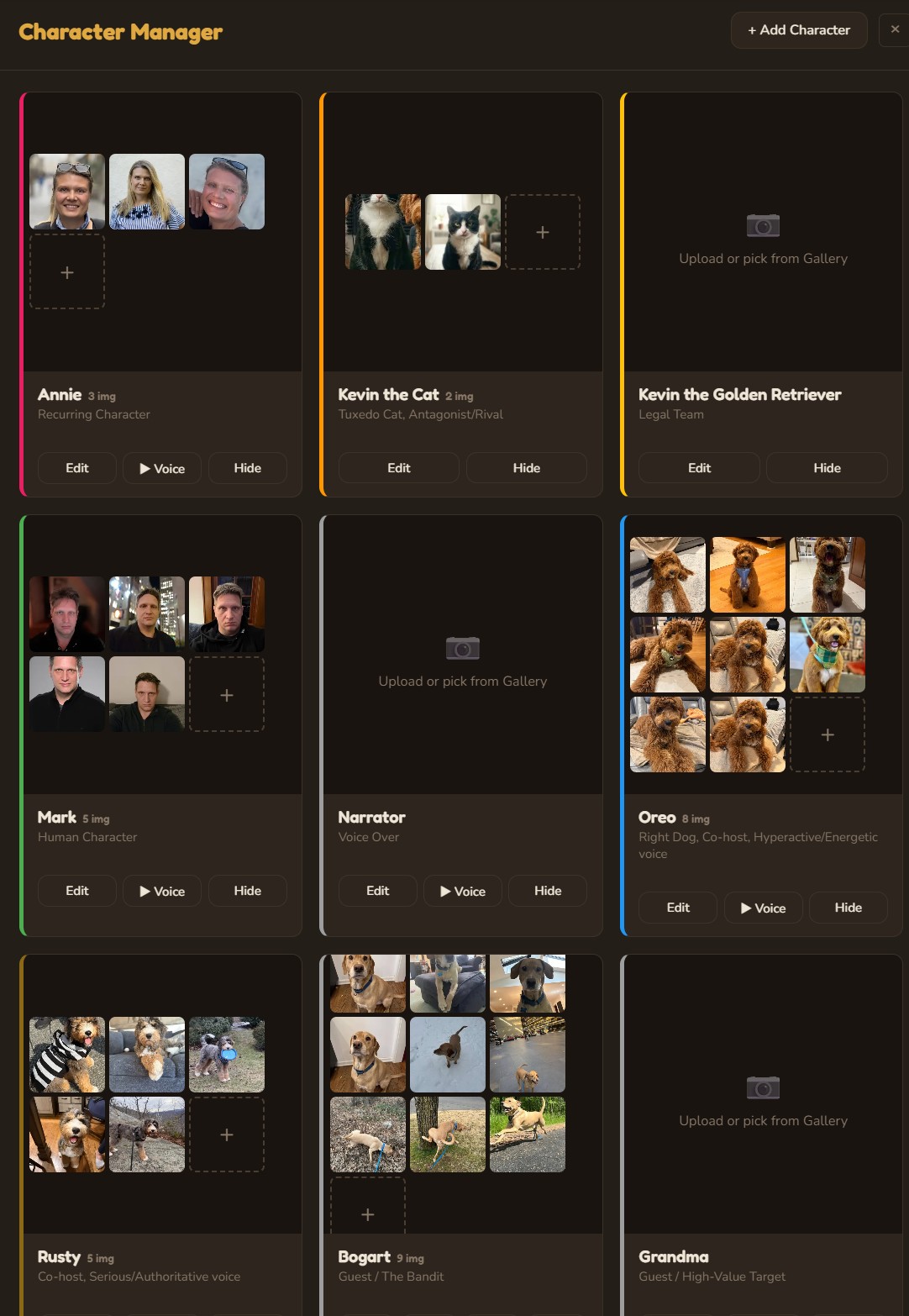
Character Manager
Define characters with role, personality, visual description, and speech style. Upload reference images for consistent AI generation. Assign ElevenLabs voice profiles with preview playback. Characters persist across all episodes and inform every AI generation.
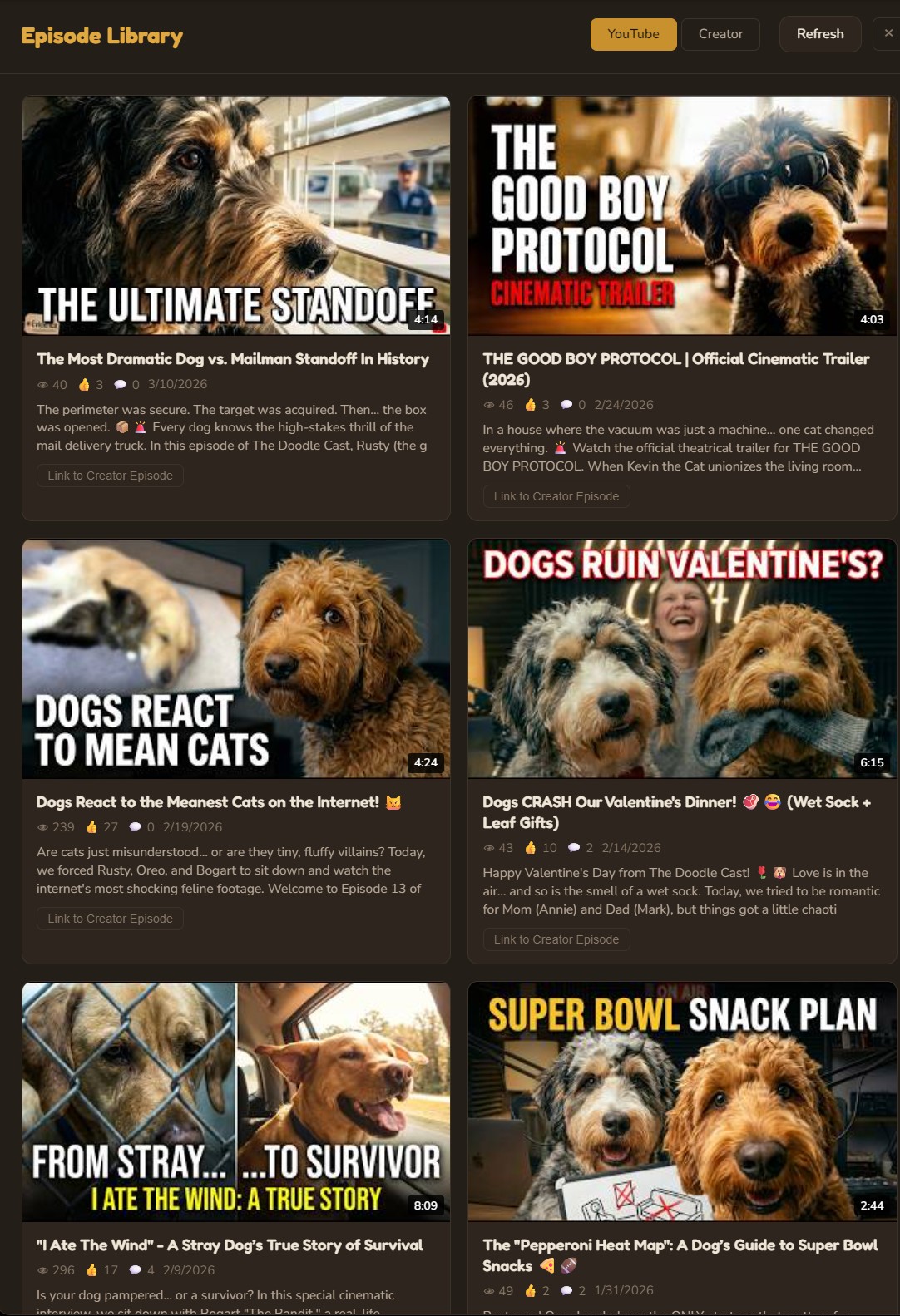
Episode Library
A complete production dashboard showing every episode across all stages of development — from draft ideas to published videos. Filter by status, search by title, and jump directly into any production step.
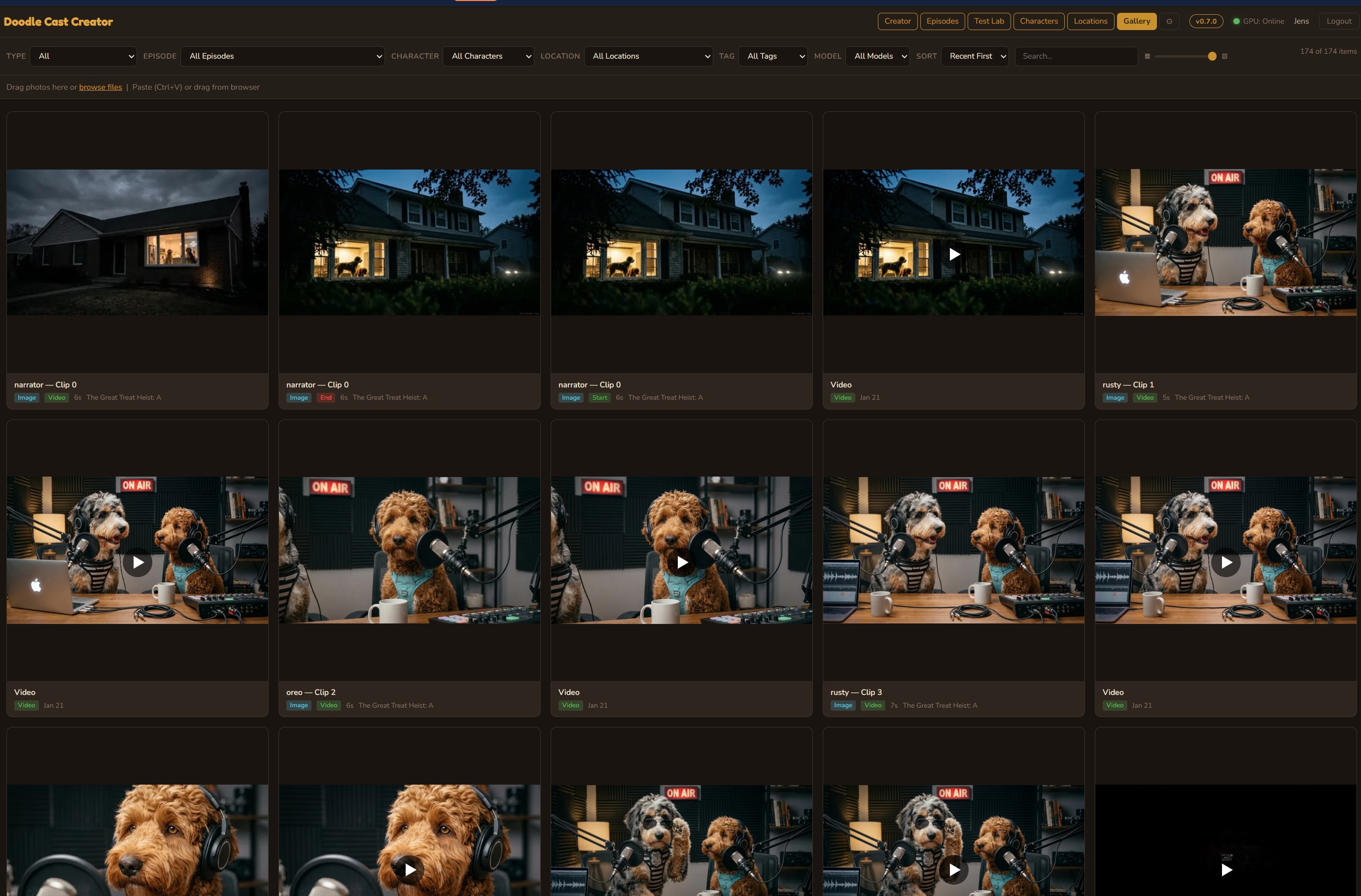
Media Library
Centralized asset management for every image and video across all episodes. Browse by model, date, or episode. Drag-and-drop upload, crop, rotate, and adjust — all with full undo support.
How it all connects
A hybrid architecture where cloud APIs deliver the highest-quality generation (Veo, Gemini, ElevenLabs) while a local GPU provides open-source alternatives and hardware encoding. The VPS orchestrates everything, and each AI agent is purpose-built for its stage of the pipeline.
Technology deep dive
Every component was built from scratch — no video editing frameworks, no SaaS dependencies, no drag-and-drop website builders. Pure Node.js, vanilla JavaScript, and ffmpeg.
Hybrid Cloud + Local Architecture
Cloud APIs (Google Veo, Gemini) deliver the highest-quality video and image generation, while a local RTX 5090 (32 GB VRAM) provides open-source alternatives and handles NVENC encoding. The system is designed to scale with new cloud models as they become available.
ffmpeg Compositing Engine
Each clip is assembled with complex filter graphs: per-stream volume with keyframe expressions, 4-input amix with explicit weights, sample rate normalization, pad/trim alignment, and cfr frame timing — all generated dynamically per clip.
Multi-LLM Orchestration
A pool of local models (Qwen3:32B, Qwen3:8B, Gemma3:27B, Gemma3:12B) runs on the RTX 5090 via a llama-swap router that selects whichever model is already resident in VRAM — large-model reasoning does not stall on a cold-load when smaller models are warm. Cloud APIs (Gemini, Grok, Claude) provide additional perspectives. A judge model synthesizes competing outputs into a final creative decision.
ComfyUI Workflows
Local open-source video models run via ComfyUI on the RTX 5090: WAN 2.2 for image-to-video and LTX 2.3 for longer clips. These complement cloud models like Veo, giving creators the choice between speed, cost, and quality depending on the scene.
Intelligent Cache System
A 5 GB LRU cache on the VPS holds active assets. Google Drive provides permanent storage. Cache eviction never deletes files that haven't been backed up. A scheduled cleanup job runs every 6 hours, backing up unbacked assets before evicting.
Show Bible System
A living knowledge base that grows with every episode. Tracks character arcs, running gags, location details, dialogue patterns, and YouTube analytics. Automatically condensed for local models via Qwen 8B to fit within smaller context windows.
Multi-Platform Social Engine
OAuth 2.0 flows for YouTube, Facebook, Instagram, TikTok, and X/Twitter. Each platform has dedicated publish functions handling format requirements, API quirks, and token refresh. An auto-publisher polls every 60 seconds to fire scheduled posts.
Cross-Platform Analytics
Aggregates views, likes, comments, and shares from all five platforms into a unified dashboard. Daily snapshots build 30-day trend charts. YouTube research reports analyze channel performance, competitor positioning, and optimal posting schedules.
Resend Email Notifications
Branded HTML email alerts fire after every auto-publish: platform badge, clip title, direct link, and dashboard CTA. Missed-schedule alerts notify when a scheduled post fails or is overdue.
The AI model stack, one pipeline
No single model can do everything. The Creator orchestrates specialized models for each phase of production — local where possible, cloud where necessary. Per-step model selection lets each creative stage use a different LLM. v1.2 adds Grok 4 with live web search; v2.1 adds an audio-visual active-speaker detection model and Speech-to-Speech voice replacement.
llama.cpp (Qwen3:32B / Qwen3:8B / Gemma3:27B / Gemma3:12B)
Local LLMs for brainstorming, script writing, location extraction, and channel-strategy reasoning. Zero API costs, unlimited iterations. Served on the RTX 5090 by llama.cpp behind a llama-swap router that picks whichever model is already resident in VRAM — large-model reasoning never blocks on a cold-load cycle when smaller models are warm from another task.
Gemini + Veo (Google Cloud)
The primary production engine for video (Veo), images, and script generation. Cloud models deliver the highest quality and are the default choice for published episodes.
Grok 4 (xAI)
The creative director’s judge and the Research & Debate engine. Evaluates pitches, conducts live web research, and generates fact-heavy scripts with real-time data.
Claude (Anthropic)
Alternative script writer for episodes that need a different narrative style. Strong at long-form structure and character consistency.
ElevenLabs (TTS + Speech-to-Speech)
Voice synthesis for 7+ recurring characters, each with a unique voice profile. v2.1 also wires ElevenLabs Speech-to-Speech for voice replacement on Google Flow video output — the timing and inflection of the source voice is preserved while the speaker identity is swapped to the character’s ElevenLabs voice. Also generates sound effects and music tracks from text descriptions.
WAN 2.2 / LTX 2.3 (Local GPU)
Open-source video models running on the RTX 5090 via ComfyUI. A cost-effective local alternative for drafts, iterations, and experimentation before committing to cloud renders.
Z-Image-Turbo / SDXL
Fast image generation for scene creation. Sub-2-second generation via ComfyUI with 4-step sampling. Produces photorealistic starting frames.
Gemini 2.5 Flash
Fast, cost-effective model for shorts idea generation, metadata, and schedule recommendations. Serves as the default fallback when local models are unavailable.
Faster-Whisper (Transcription)
Word-level timestamp transcription for accurate chapter generation and subtitle creation. Runs locally on the RTX 5090 for zero-cost transcription.
LR-ASD (Active Speaker Detection)
A lightweight audio-visual active-speaker model. Runs on the local GPU during the podcast-to-shorts pipeline to identify which face in each frame belongs to the currently-speaking voice. The result drives the per-frame crop window in the 9:16 vertical export, so the camera follows the active speaker rather than the largest face on screen. A largest-face fallback remains when the model is unavailable.
YouTube + Social APIs
Publishes to YouTube, Facebook, Instagram, TikTok, and X via OAuth. Tracks cross-platform analytics and feeds performance data back into the show bible.
Deep technical breakdown
Every design decision in Showspring had a real constraint behind it. This section walks through the shape of the implementation at a high level: module topology, data model, rate-limit strategy, the dynamic render engine, the hermetic test pipeline, the hybrid cloud + local GPU routing, and the non-destructive cache policy. The goal is to show why the system looks the way it does, not to hand out a runbook.
1. Modular Composition Root
The main entry point is a thin bootstrap: environment validation, middleware stack, layered rate limiters, session setup, and router registration. It holds essentially no business logic. All production behavior lives in 22 domain routers and 11 shared services underneath. Each router owns its validation, data access, and error responses; services are pure functional units callable from any router.
2. Layered Rate Limiting
Rate limiting is layered by cost class. A default limiter covers general API traffic. A much tighter limiter applies to cost-sensitive endpoints (LLM calls, image generation, and render dispatch) matched by both literal path and regex patterns. The tightest cap applies to authentication and OAuth callback flows to resist brute-force and credential-stuffing attempts. Static-asset bulk-fetch paths are excluded from API rate limiting. The expensive limiter runs before the global limiter so the global counter still sees every request.
Specific thresholds and endpoint lists are intentionally not published — tuning parameters that affect throttling behavior are treated as internal configuration.
3. Normalized Data Model
The persistence layer is a normalized relational schema grouped into five concerns. The database engine supports concurrent reads during long-running writes (render jobs, image generation), and foreign-key relationships keep referential integrity explicit. Every table is exercised by the integration test suite against a fresh ephemeral database per run.
4. Dynamic Render Engine
Render is not a wrapper around a preset. Every episode, short, and podcast clip is composited by building a filter graph at runtime from the clip's tracks, volume automation, and timing metadata. Four audio streams are mixed per clip with explicit per-stream weights and fade/duck automation, then paired with the video stream and handed to a hardware-accelerated encoder.
Sample-rate normalize
frame rate
H.264 out
Each volume envelope, fade, duck, and weight is generated per clip from the clip's metadata in the database, not hand-authored. The same engine handles episodes, shorts, and podcast clips via a shared filter builder, which is why a 5-second short and a 12-minute episode both render through the same code path.
5. Hermetic Integration Test Pipeline
The test suite is fully hermetic: it boots the real server binary against an ephemeral database, stubs every external AI and platform API, and exercises each router end-to-end over real HTTP. 113 integration cases run on every CI build. Because the runner uses the production code paths, regressions in rate limiting, middleware, and business logic all surface before merge.
6. Hybrid Cloud + Local GPU Topology
The orchestrator delegates GPU-bound work (video generation, image synthesis, encoding, transcription, adaptive streaming prep) to a local GPU host over a private tunnel, while cost-sensitive and highest-quality work flows to cloud AI APIs. A health poller keeps cloud fallbacks warm, so any local outage degrades gracefully rather than blocking the pipeline.
· Frontier LLM inference
· Production image generation
· Voice synthesis
· Platform publishing APIs
· Local LLM inference for drafts
· Fast iterative image generation
· Hardware-accelerated encoding
· Transcription & HLS segmentation
Routing is per-job, not per-user. The same episode can fan out cloud video + local draft image + cloud voice + local encoding based on cost, quality, and availability.
7. Non-Destructive Cache Policy
Cache eviction normally deletes whatever is coldest. That is unacceptable here — a render that has not yet been archived cannot be recreated without re-running the whole GPU pipeline. Eviction therefore follows a strict backup-first order: archive to permanent storage, verify the copy, then reclaim local space. A crash mid-cycle never loses data.
If the remote archive is unreachable during a cleanup cycle, the cache simply grows a little past its cap until the next cycle — which is far cheaper than losing a not-yet-backed-up render.
Why This Matters
None of this is required to “make an AI video.” It is required to run one in production, every day, against rate-limited third-party APIs, on a shared VPS behind a reverse proxy, with a cache that cannot afford to lose files, with a test suite that has to be deterministic because it runs on every change. These are the details that separate a weekend prototype from a production studio shipping AI-generated content on a real schedule.
See it in action
Watch the episodes produced entirely by Showspring on YouTube.
Visit The Doodle Cast ↗